What clipping does
Clipping flattens the tops of peaks so you can turn the track up. The catch is the corner it leaves where the curve meets the flat top. A sharp corner is a burst of high frequencies, and that burst is the distortion you hear.
Those high frequencies follow a fixed pattern. Clipping a symmetrical wave adds odd harmonics: the 3rd, 5th, 7th and so on, each quieter than the last. On the right source that sounds musical. On the wrong one it stacks up as fizz.
Why the source matters
The harmonics land high in the spectrum, where your ear is most sensitive and a quiet source has nothing to hide them.
Clips well: kick, snare body, dense full mixes, already-distorted parts and screaming vocals. The transient is over before the harmonics register, so you can clip several decibels before anyone notices.
Clips badly: cymbals, hi-hats, breathy consonants, acoustic guitar, clean synths and pure tones, and anything delicate and sustained. A sustained note gives the harmonics time to be heard, and nothing covers them.
Bass takes clipping worse than most people expect. You are shaving a slow waveform rather than a quick transient, so it tends to sound squashed and buzzy rather than louder.
The worst case for any clipper is bright material driven hard.
Shape: how sharp the corner is
A softer corner (a softer knee) reduces the harsh artifacts, but it also softens the transient you were trying to keep. That is the trade-off.
- Loud, distorted music usually suits hard clipping. The transient matters more, and there is plenty going on to hide the fizz.
- Softer music usually suits a softer clip. A slightly rounded attack is worth the smoother sound.
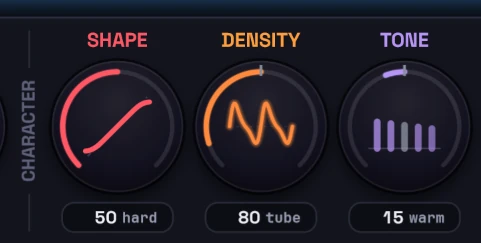
In HardStop Pro, set this with Shape on the advanced page.
Adaptive mode makes the choice for you. It changes the shape to suit the audio as it plays, keeping transients punchy and easing off where a hard corner would turn harsh. Classic vs Adaptive mode covers when to use each.
When a source won't clip cleanly
Try these in order:
- Clip less and let something else share the work. Tape saturation before the clipper rounds the peaks off a little first. Two decibels of clipping plus a limiter usually beats six decibels of clipping alone.
- Clip in stages. Take a little at the snare track, the drum bus, the instrument bus and the master. Several small bites stay cleaner than one big one.
- Check what you are removing. Turn on Delta listen, which is in Basic too. You should hear only the tips of peaks. If you can hear the performance, you are clipping too much.
HardStop Pro adds three more controls, covered in detail in Tone, Density and Mix:
- Tone counters the tonal shift the harmonics cause, warmer or brighter.
- Density adds harmonic excitement that helps glue big peaks together, especially on the tube setting.
- Mix blends the dry signal back in to restore some of the original punch.
Still fighting it? Email support and tell us the source.