




This is WHY Your Songs Aren’t LOUD on Streaming Platforms (Spotify, Apple Music) and How to Fix It
Quick summary
Is your music sounding quiet on Spotify or Apple Music despite being professionally mastered? You’re not alone. This guide demystifies LUFS, loudness normalization, and true peak levels, revealing why top-charting songs often ignore the recommended -14 LUFS target and how you can achieve competitive loudness without sacrificing dynamics.
What’s In This Article
- Understanding Streaming Loudness: LUFS, Normalization, and How Platforms Process Your Music
- What are LUFS and Why Do They Matter?
- How Streaming Platforms Measure LUFS
- The Three Types of LUFS Measurements
- The LUFS Gating Process: Why Quiet Parts Are Ignored
- The “Dynamic Music Penalty” on Streaming
- Why Mastering Above Streaming Targets Still Works (and is Recommended)
- Ignoring the -14 LUFS Target: A Strategic Choice
- The Impact: Mastering Too Loud vs. Too Quiet
- Evidence from Top-Charting Songs
- Navigating True Peaks and Compression Artifacts for Optimal Sound
- What are True Peaks and Why Are They Critical?
- How True Peak Meters Work
- Streaming Platform Recommendations for True Peak
- The Role of Compression Artifacts
- The Best Advice Before Releasing Your Song for Online Distribution
Key moments in the video
- 0:00 — Why Top Charting Songs Ignore Streaming Loudness Rules
- 0:52 — What are LUFS & what you need to know.
- 3:21 — Another major consideration when measuring LUFS of your song…
- 4:18 — The 3 different LUFS measurements you need to know
- 5:40 — Gating and measuring integrated program loudness
- 10:14 — Strategies for Releasing Loud Songs on Streaming Platforms
- 11:35 — What happens if you master a song too loud?
- 12:01 — What happens if you master a song too quietly?
- 13:36 — Evidence About Loudness from Chart Topping Songs
- 15:25 — Intersample peaks (ISPs) & true peak considerations for streaming
- 17:11 — The difference between true peak vs normal metering
- 19:06 — The impact of streaming and compression artifacts on your music
- 20:32 — Best advice before releasing song for online distribution
- 22:00 — Best resources for mastering in a home studio
- 22:31 — Download my FREE mastering infographic cheat sheets!
Enjoying the Video?
Get more home-studio tutorials, mixing breakdowns, and gear deep-dives every week.
You’ve poured your heart and soul into your latest track, spent hours mixing and mastering, only to find it sounds… quiet on Spotify or Apple Music.
It’s a frustrating experience many home studio owners face, especially when top-charting songs seem to defy the recommended loudness targets. For instance, the average top-charting Spotify song currently clocks in at around -8.4 LUFS, while Spotify’s target is -14 LUFS. That’s a huge 6 dB difference!
This isn’t a mistake by professional mastering engineers; it’s a fundamental misunderstanding of how streaming platforms handle loudness. Today, I’m going to pull back the curtain and explain exactly why your songs might not be sounding as loud as you want them to on streaming platforms, and what mastering strategies you can use to fix it.
The key lies in understanding how LUFS (Loudness Unit Full Scale) is measured, how streaming services apply loudness normalization, and the critical role of true peak levels.
By the end of this article, you’ll have the knowledge to make your music sound loud, punchy, and competitive without sacrificing its dynamics.
Understanding Streaming Loudness: LUFS, Normalization, and How Platforms Process Your Music
When you upload your music for distribution, every major streaming platform measures your song’s loudness using LUFS. But what exactly is LUFS, and how does it relate to how loud your music sounds to listeners?
What are LUFS and Why Do They Matter?
LUFS, or Loudness Unit Full Scale, is a measurement designed to quantify the human perceived loudness of your audio track. Before LUFS, engineers primarily used RMS (Root Mean Squared), which is an unweighted measurement based on the power density of your material. The problem with RMS is that it doesn’t accurately represent how we, as human beings, actually perceive loudness in music.
LUFS emerged from the broadcast industry’s need to control the loudness of commercials, leading to the ITU-R BS.1770 standard for broadcast loudness [3]. This standard provides a method to measure loudness that aligns with human hearing, making it a far more relevant metric for music.
How Streaming Platforms Measure LUFS
The way LUFS is measured is crucial to understanding why some songs sound louder than others. The process involves a two-stage pre-filtering system:
- Acoustic Head Model (High Shelf): The first stage accounts for the acoustic effects of the human head, modeled as a sphere. Practically, this means a 4 dB boost is applied around 2 kHz. This filter prevents engineers from simply boosting high frequencies to make a song feel louder and bypass loudness limitations. When the top end is boosted during measurement, it will contribute more to the overall LUFS calculation.
- High-Pass Filter: Secondly, a high-pass filter rolls off frequencies below approximately 100 Hz. This is incredibly important for sub-heavy music (like theatrical scores or tracks with prominent 808s). Our ears aren’t as sensitive to sub-frequencies, so without this filter, bass-heavy music would be unfairly penalized for loudness if measured by older methods like RMS. This filter helps balance sub-heavy music, allowing it to compete with mid-range-focused genres like pop and rock without being excessively quieted.
The Three Types of LUFS Measurements
When you look at a LUFS meter in your DAW, you’ll typically see three different time-based measurements:
- Momentary LUFS: This is a fast-moving window, measuring loudness over approximately 400 milliseconds. It shows you the immediate loudness peaks.
- Short-Term LUFS: This measures loudness over 3-second moving windows, giving you a slightly more averaged view of current loudness.
- Integrated LUFS: This is the overall loudness measurement from start to finish of your track. When Spotify, Apple Music, and other streaming platforms refer to their -14 LUFS (or similar) target, they are talking about your song’s integrated loudness.
The LUFS Gating Process: Why Quiet Parts Are Ignored
Beyond the filtering, there’s another crucial aspect of LUFS measurement: gating. After the K-weighting filter is applied, any audio below -70 LUFS is disregarded from the overall integrated loudness measurement. This prevents long silences or extremely quiet sections from artificially lowering the integrated LUFS number. Essentially, the measurement focuses on the louder, more relevant parts of your song.
But it doesn’t stop there. Once an initial integrated LUFS number is calculated, a secondary gate is set at 10 LU (Loudness Units) below that number. For example, if your song’s integrated loudness is calculated at -14 LUFS, a gate will be set at -24 LUFS. Anything below this secondary gate is also excluded from the final integrated loudness measurement.
The “Dynamic Music Penalty” on Streaming
This gating process has a profound, often counter-intuitive, impact on dynamic music. If your track is highly dynamic—meaning more than 10 dB difference between, say, your quiet verses and loud choruses—the streaming service’s algorithm will primarily measure only the loudest sections (your choruses).
This means your song will be assigned a higher integrated LUFS number than if the quieter sections were fully averaged in. As a result, when the streaming platform applies loudness normalization, it will turn your dynamic song down more significantly to meet its target (e.g., -14 LUFS). When played back-to-back with a less dynamic track, your dynamic song will often feel quieter, even if both are normalized to the same target.
This is why you might hear a very dynamic song sound less impactful next to a more controlled, less dynamic track in the same genre. There are sweet spots for dynamic range that maximize perceived loudness and punch on streaming platforms, and it’s not always about making the song quieter overall.
Why Mastering Above Streaming Targets Still Works (and is Recommended)
Given the complexities of LUFS measurement and normalization, what’s the best strategy for mastering your music for online distribution? It often involves ignoring the specific LUFS targets streaming platforms suggest.
Ignoring the -14 LUFS Target: A Strategic Choice
Spotify, Apple Music, YouTube, Tidal, and other platforms all have different loudness targets, and these targets can change at any time. If you rigidly master your music to, say, -14 LUFS without considering the dynamics, impact, and overall feel of your song, you’re setting yourself up for potential disappointment.
My recommendation is to largely ignore the specific -14 LUFS (or similar) numbers. Instead, focus on making your song sound as loud, punchy, and impactful as it can be while still serving the song and without being overly compressed. This approach puts you in control.
The Impact: Mastering Too Loud vs. Too Quiet
Let’s consider what happens if you master your song at different loudness levels:
- Mastering Too Loud (e.g., -5 LUFS): If your song is mastered significantly louder than the platform’s target, streaming services will simply turn down the overall volume to match their normalization level. Crucially, they typically only adjust the volume, leaving your carefully crafted dynamics intact.
- Mastering Too Quiet (e.g., integrated loudness below target): If your song is too quiet or excessively dynamic, some streaming services might turn it up a bit. However, others might apply their own limiter to achieve the target loudness. This is problematic because an algorithm-applied limiter can completely alter the feel and dynamics of your track, taking control away from you, the artist.
By mastering your song to sound as good and as loud as it possibly can, you ensure that the only adjustment streaming platforms make is the volume. You retain full control over the dynamics and impact of your music.
Furthermore, not all streaming listeners have loudness normalization turned on by default. To keep your music competitive and sounding its best in all scenarios, it’s generally better to err on the side of having a loud, but still great-sounding, master.
Evidence from Top-Charting Songs
Don’t just take my word for it. Data from top-charting songs consistently shows that professional masters are often significantly louder than streaming targets. Articles from industry leaders like iZotope confirm this, analyzing the loudness levels of popular tracks.
- Many of the biggest songs range from -6 LUFS to -11 LUFS integrated, all significantly louder than typical -14 LUFS or -16 LUFS targets.
- Loudness requirements also vary by genre. K-pop, pop, and hip-hop are often very dense and loud. Metal, for example, frequently sees masters between -5 LUFS and -7 LUFS due to the genre’s aggressive, distorted nature. These genres often sound best when loud and competitive.
This isn’t a coincidence; it’s a strategic approach to ensure music has maximum impact and presence, regardless of normalization.
Navigating True Peaks and Compression Artifacts for Optimal Sound
Beyond LUFS, another critical factor for delivering great-sounding music to streaming platforms is managing true peaks and understanding how compression artifacts can affect your sound.
What are True Peaks and Why Are They Critical?
True peak levels address the concept of intersample peaks (ISPs). When you have a digital waveform that’s very close to digital zero (0 dBFS), the process of converting that digital signal back into an analog waveform (via a Digital-to-Analog Converter, or DAC) can cause the reconstructed analog signal to momentarily exceed 0 dBFS. These are intersample peaks.
While most modern DACs can handle some intersample peaks without noticeable distortion, excessive ISPs, especially in older stereo systems, can lead to audible clipping or crackling. Surprisingly, many top-charting songs actually have true peaks above 0 dB, some even as high as +2.3 dB, indicating heavily clipped waveforms.
How True Peak Meters Work
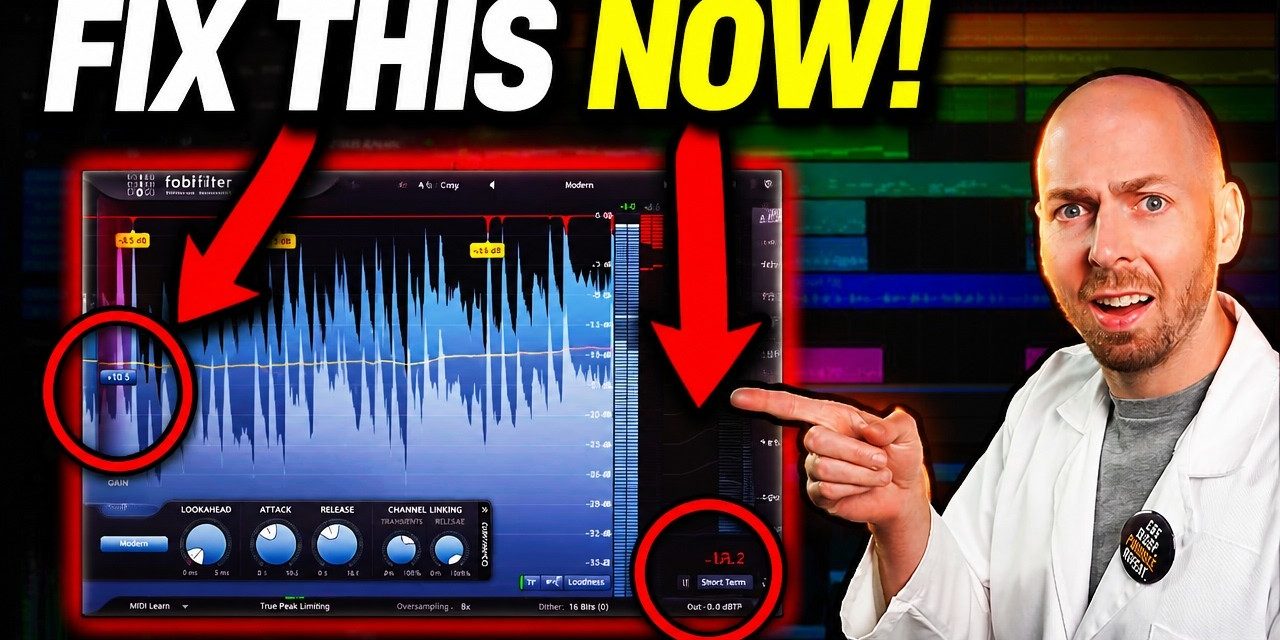
True peak meters are designed to accurately predict these intersample peaks. They typically operate with 4x oversampling and incorporate a low-pass filter, as detailed in the ITU-R BS.1770 document. This allows them to effectively ‘see’ what happens between the digital samples and measure the true amplitude of the reconstructed analog waveform.
For a ‘cheap hack’ to simulate a true peak limiter, you can set your conventional limiter to 4x oversampling. While not perfectly accurate, it gets you very close to the desired behavior.
Streaming Platform Recommendations for True Peak
To prevent intersample peaks, streaming platforms generally recommend setting your output ceiling to something like -1 dB True Peak (dBTP) or -2 dBTP, especially for heavily clipped or very loud and dense music. This provides a safe amount of headroom for the conversion process, but it drops the loudness a bit if the listeners don’t have loudness normalization checked.
The Role of Compression Artifacts
There’s another critical reason for baking in some extra headroom: when you upload your high-quality audio files to streaming platforms, they will compress them into lower-quality, streamable formats (e.g., MP3, AAC). This compression process can introduce errors that generate large intersample peaks, potentially causing distortion during playback.
My recommendation for a safe middle ground is to set your output limiter to -1 dB True Peak. Most modern playback devices and DACs will handle any remaining intersample peaks without noticeable distortion. If you want to push it, you could even export your song at -0.2 dBTP, and it will likely be fine, but -1 dBTP offers a very robust safeguard.
The Best Advice Before Releasing Your Song for Online Distribution
The best streaming level for your music isn’t about hitting an arbitrary LUFS target, nor is it simply about making the loudest master possible. It’s about finding the sweet spot where your song is as loud as it can be while preserving its clarity, impact, and emotional intent.
As long as you focus on this principle and export your song with a safe true peak ceiling (like -1 dBTP), your music will sound great wherever it’s played. Don’t compromise the dynamics or the feel of your song to appease a moving target set by streaming platforms. As the data from top tracks shows, some songs simply sound better when they’re louder, and you have the control to achieve that.
If you’re ready to dive deeper into mastering and learn how to maximize your song’s impact, loudness, and balance to ensure it sounds fantastic everywhere, check out my complete start-to-finish home studio mastering course, Conquer the Master Bus. It’s designed specifically for the challenges we face in home studios and provides a six-step framework to make your music as loud, powerful, and impactful as possible.
Key takeaways
- Streaming platforms use LUFS (Loudness Unit Full Scale) to measure perceived loudness, not RMS.
- LUFS measurement includes filtering (high-shelf boost at 2kHz, high-pass at 100Hz) and a gating process that primarily measures the loudest parts of your song.
- Highly dynamic songs can suffer a ‘dynamic music penalty,’ appearing quieter after normalization because the algorithm turns them down more.
- It’s generally better to master your music to sound as loud and impactful as possible while preserving dynamics, rather than strictly adhering to -14 LUFS targets.
- Loudly mastered songs are typically only turned down by streaming services, preserving your dynamics, whereas quiet songs might have limiters applied by algorithms.
- Top-charting songs often have integrated LUFS significantly louder than streaming platform targets.
- Always consider True Peak levels (aim for -1 dBTP or -2 dBTP) to prevent intersample peaks and distortion during digital-to-analog conversion and codec compression.
Frequently asked questions
Why do my songs sound quieter on streaming platforms like Spotify?
Your songs might sound quieter because streaming platforms apply ‘loudness normalization.’ If your song is very dynamic, the platform’s algorithm may primarily measure only your loudest sections, assign a higher LUFS, and then turn it down more significantly to match their target. Also, if your master is too quiet, some services might apply their own limiter, altering your dynamics.
Should I master my music to -14 LUFS for Spotify?
No, it’s generally recommended to ignore the -14 LUFS target as a strict rule. Instead, focus on mastering your song to be as loud, punchy, and impactful as it can be while preserving its clarity and emotion, without excessive compression. Streaming platforms will simply turn down a loud, well-mastered track, but they might apply undesirable processing (like limiting) to a quiet one.
What is ‘True Peak’ and why is it important for streaming?
True Peak refers to the actual peak level of an audio signal after it’s converted from digital to analog, including intersample peaks (ISPs). These ISPs can exceed 0 dBFS even if your digital signal doesn’t, potentially causing clipping or distortion during playback, especially on older systems. Streaming platforms recommend setting your output ceiling to -1 dB True Peak (dBTP) or -2 dBTP to provide headroom and prevent these issues, especially since their compression codecs can also introduce ISPs.
Want to see the whole walkthrough? Watch the full video on YouTube.