








What Is Mastering? What a Mastering Engineer Does and Whether You Need It
Quick summary
Mastering is the final step before you release music. A mastering engineer takes your finished stereo mix, sweetens it with EQ, dynamics, stereo width and loudness, checks it for problems, and exports it in the right formats, with the right metadata, for streaming, download, CD or vinyl. Mixing balances the individual tracks inside a song. Mastering polishes the finished mix and makes a whole release sound consistent. Below I cover what a mastering engineer actually does, how streaming loudness normalization works in 2026, what mastering can and can’t fix, and how to tell whether your song needs it.
Updated : completely rewritten and expanded with new diagrams, current streaming loudness facts, a deliverables checklist, FAQs, and a video of my full mastering chain. Originally published March 1, 2018.
What’s In This Article
- What Is Mastering?
- Mixing vs. Mastering: What’s the Difference?
- Where Did Mastering Come From?
- What Does a Mastering Engineer Actually Do?
- How Loud Should a Master Be for Streaming in 2026?
- What Do You Get Back From Mastering?
- Why Is Mastering Important?
- What Can Mastering Fix, and What Can’t It Fix?
- Do You Need Mastering?
Key moments in the video
- 0:26: Pre-Master Mix: What a Mastering-Ready Mix Sounds Like
- 1:03: What to Listen For Before Mastering
- 1:32: Mastering EQ with FabFilter Pro-Q 3 (Filters & Resonances)
- 7:04: SSL Bus Compressor on the Master Bus (Attack, Release, Mix)
- 9:54: Multiband Compression: FabFilter Pro-MB Low-End Control
- 10:58: Stereo Width Trick: Abbey Road RS124 Mid/Side Compression
- 20:08: Tape Saturation for Mastering: Waves Kramer Tape
- 21:21: Max Loudness Without Losing Punch: HardStop Clipper
- 27:24: Final Limiter: Dialing in FabFilter Pro-L 2
- 28:08: Before & After: Final Master Loudness (LUFS)
Enjoying the Video?
Get more home-studio tutorials, mixing breakdowns, and gear deep-dives every week.
Most people understand what mixing is, but far fewer understand what mastering is and how it’s different. It gets called a dark art, and that reputation makes it hard to know whether you should pay for it. I’ve been mixing and mastering music for more than twenty years, so let me take the mystery out of it: what mastering is, where it came from, what happens in a session, and when it’s worth it (and when it isn’t).
What Is Mastering?
Here’s the one-sentence version: mastering sweetens the audio of the final mixes and prepares the songs for reproduction and distribution.
Mastering is the last step in the recording process. The mix engineer exports each finished song as a single stereo file and sends it to the mastering engineer. The mastering engineer enhances that file by adjusting EQ, dynamics, stereo width and volume, then exports the song or album in the audio formats needed for release.
One exception: stem mastering. Sometimes the mix is delivered as a handful of group tracks, or stems (drums, bass, music, vocals), instead of one file. The mastering engineer then balances and processes those groups, which gives a little more control. That’s the exception, though. Mastering typically starts from a single stereo file, and that’s what I mean in the rest of this article.
Is it really that simple? Yes and no. The idea is simple, but a lot of important details go into doing it well, and those details are what the rest of this article is about.
Mixing vs. Mastering: What’s the Difference?
Mastering is very different from mixing. Mixing balances all the individual elements in a song and makes sure each one has its own space. Once those decisions are final, the mix is exported. Mastering takes that exported mix and works on it as a whole. A mastering engineer can’t turn up just the vocal or swap the snare sample. Every move affects the entire song, which is exactly why the moves are small and careful.
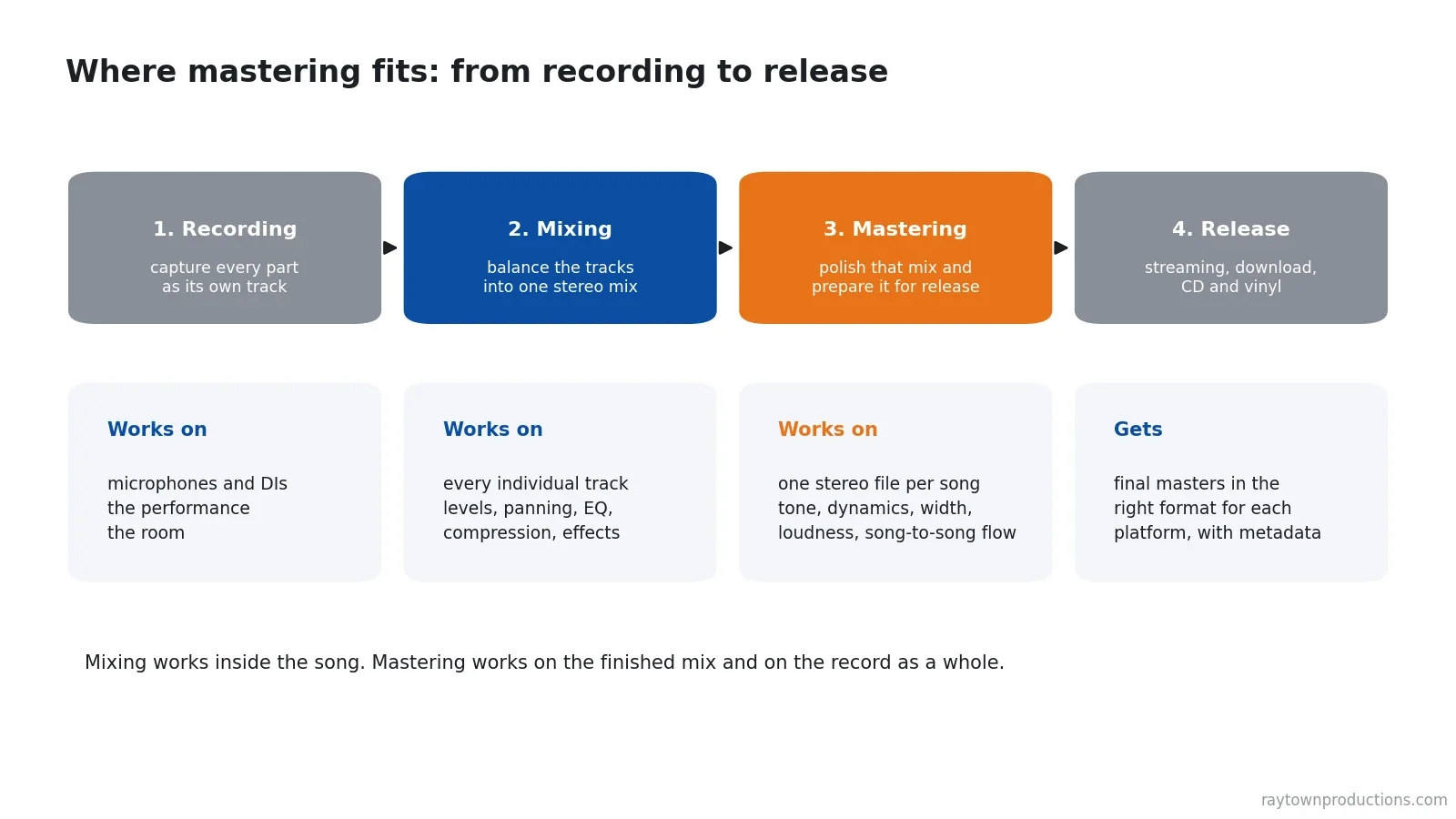
| Mixing | Mastering | |
|---|---|---|
| Works on | Every individual track in the session | One stereo file per song |
| Main goal | Balance the elements and give each its own space | Sweeten the finished mix and prepare it for release |
| Typical moves | Levels, panning, EQ, compression and effects on each track | Overall EQ, dynamics, stereo width and loudness |
| Scope | One song at a time | The whole release, so every song sounds like it belongs |
| Delivers | A stereo mix file | Final masters in each format, with metadata |
If you’re still in the mix stage, run through my final mix checklist before you call it done. The better the mix, the more mastering can do for it.
Where Did Mastering Come From?
In the early 1900s, recording and mastering were essentially the same job. Musicians played or sang into an acoustic horn, which made a diaphragm vibrate. Those vibrations drove a cutting head that cut grooves directly into a disc. That disc was the master disc, and the audio it held was the master recording.
Magnetic tape reached the recording industry in the late 1940s and changed everything. A performance could now be captured on tape first, and the master disc could be cut later, separately from the live performance. The person who transferred the audio from tape to the disc-cutting machine was called the transfer engineer, the earliest form of what we now call a mastering engineer.
It was a difficult job. Send too low a level to the cutting machine and you got a noisy record. Send too much and you could damage the disc or the cutting lathe. It also wasn’t long before record companies noticed that the loudest records sounded best to customers. Transfer engineers learned that by shaping the frequency balance and dynamics of the tape, they could cut a louder, better-sounding record. That sold more records, and it established the need for separate mixing and mastering engineers.
Most of those principles still apply, with one huge difference: we live in a mostly digital age, where the limits of a physical disc matter less and less. That gives us freedom to master audio in ways that were impossible in the past.
What Does a Mastering Engineer Actually Do?
The goal is audio that sounds great on every playback system: your car, earbuds, a club, a phone speaker. Every song needs something different, but a typical session looks like this:
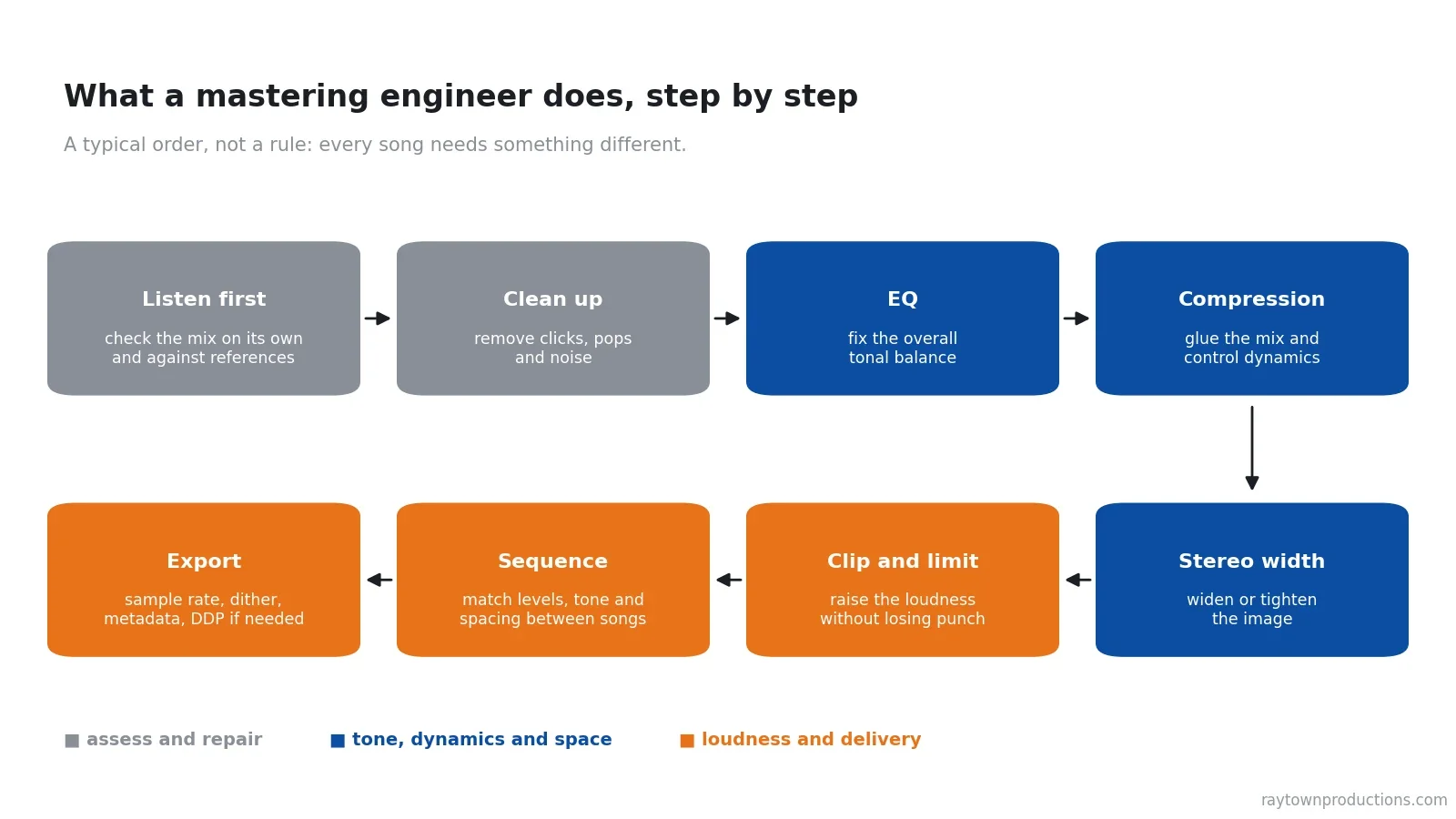
- Listen first. Before touching anything, the engineer listens to the mix on its own and against reference tracks to decide what it needs (sometimes that’s very little).
- Clean up. Clicks, pops and noise get repaired where possible.
- Balance the tone with EQ. Controlling the frequency balance is what brings out the clarity and power of the audio.
- Control the dynamics. Compression “glues” or “gels” the mix together, which adds cohesion between the instruments.
- Shape the stereo image. Widening (or tightening) the image adds to the sense of space.
- Raise the loudness. Compressing, limiting or clipping brings the song up to a level that competes with current releases.
- Sequence the release. On an EP or album, the levels, tone and spacing are matched so the songs sound consistent from one to the next.
- Export and label. The audio is converted to each delivery format, and the artist information (metadata) is added.
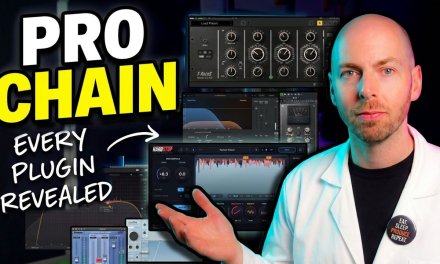
In the video above I walk through every plugin on my own master bus: EQ, bus compression, multiband compression, mid/side width, tape saturation, clipping and the final limiter. For the loudness stage I clip before I limit, using HardStop, my own clean, anti-aliased clipper (the Basic version is free). If you want the full breakdown, read my complete mastering plugin chain and why clipping before limiting keeps the punch.
Good mastering is usually subtle. If a mix needs huge EQ moves or heavy compression on the master, the better fix is almost always back in the mix.

Grab All My Favorite FREE Plugins!
How Loud Should a Master Be for Streaming in 2026?
This is where modern mastering differs most from the CD era. Streaming services use loudness normalization: they measure how loud each song is (in LUFS, a loudness unit based on how we hear) and turn it up or down so listeners aren’t reaching for the volume knob between songs.
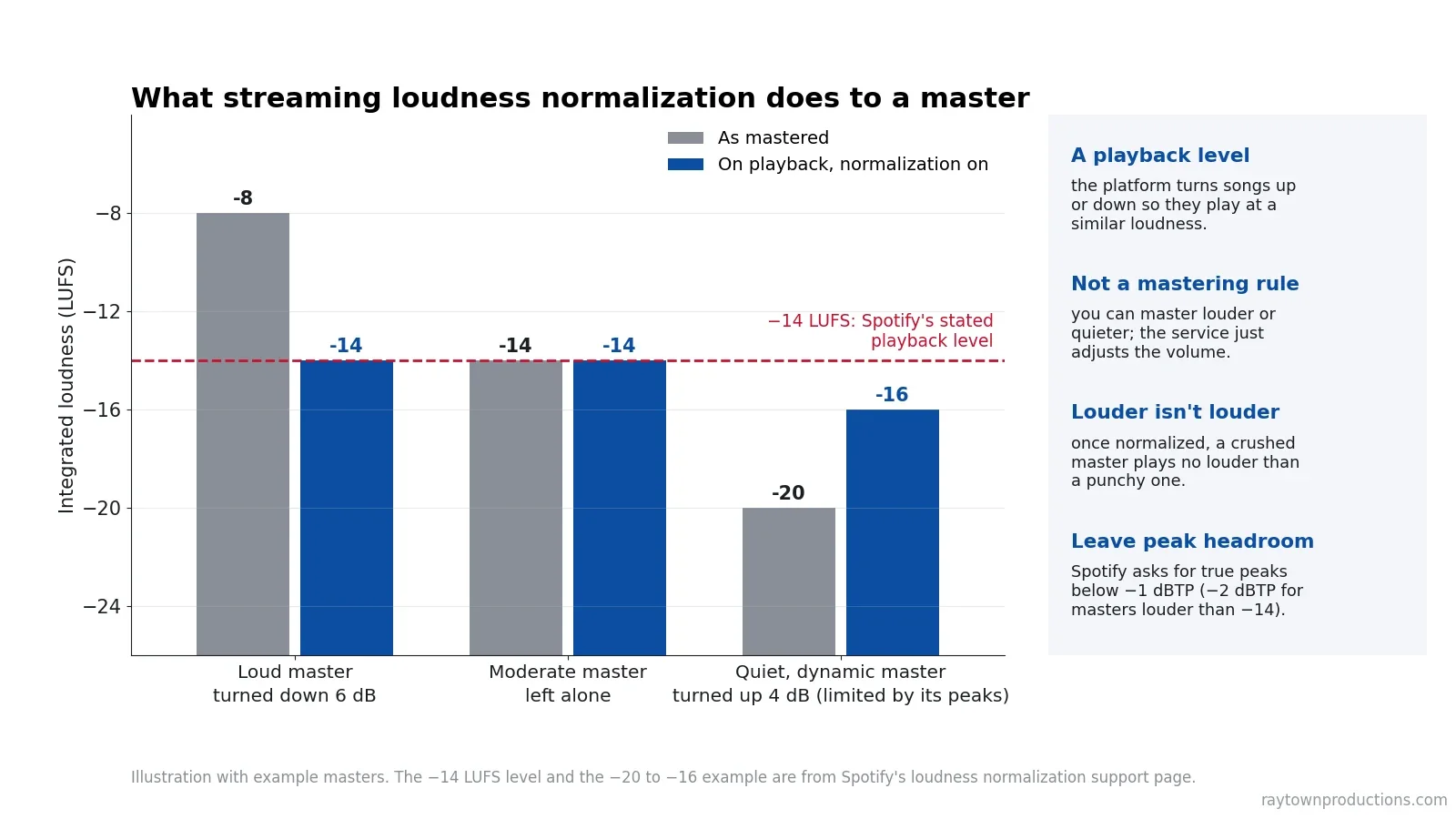
Loudness numbers get repeated online without sources, so here is only what each platform says in its own documentation as of November 2026:
| Platform | Stated playback normalization | Stated peak guidance | Source |
|---|---|---|---|
| Spotify | -14 LUFS by default. Premium listeners can also pick Loud (-11 LUFS) or Quiet (-19 LUFS). Albums are normalized as a whole. The web player and third-party devices don’t normalize. | Below -1 dBTP, or below -2 dBTP if the master is louder than -14 LUFS | Spotify: Loudness normalization |
| Apple Music | Sound Check, which can also work per album. Apple’s mastering guide doesn’t publish a LUFS figure. | At least 1 dB of headroom, and 24-bit source files | Apple Digital Masters |
| YouTube | No LUFS figure published in YouTube Help. Its “stable volume” feature is a separate thing and is turned off for YouTube Music and official music videos. | None published | YouTube Help |
These are playback levels, not mastering rules. A normalization level only tells you what the service does to the volume after you upload. It doesn’t mean every song should be mastered to that number. You’ll see figures for other services quoted around the web, but if a platform doesn’t publish one, treat it as someone’s measurement, not a spec.
So how loud should you go? The goal of mastering is to make the song as loud as you can while it still keeps the punch and depth it needs to feel right. Where that lands depends on the song. A master at -6 LUFS and a master at -10 LUFS can both sound great. Use the numbers as a guide, not as a hard rule.
Going louder than a platform’s playback level costs you nothing in volume: a heavy rock or rap master above -14 LUFS simply gets turned down on Spotify. What doesn’t come back is punch that was crushed out by over-limiting, so stop pushing when the song starts to lose its impact.
Too quiet can be the worse mistake. The platform has to turn a quiet master up, and it doesn’t do that the way you would. Spotify says it applies positive gain to softer masters but leaves 1 dB of headroom, so a quiet song with tall peaks may never reach the level of the songs around it. On its Loud setting, Spotify says it runs its own limiter on soft, dynamic tracks. That limiter knows nothing about your song, and it can sound really bad. I’d much rather set the loudness myself, with a clipper and limiter I chose, than hand that job to the platform. I dig into the numbers in my guide to loudness, bit depth and output levels for distribution.
The second streaming issue is conversion. Turning a high-resolution master into a smaller, lossy streaming format can introduce clipping and artifacts, and Spotify notes that louder tracks are more susceptible to that extra distortion. That’s why the peak guidance in the table exists. Some mastering studios go further and make separate masters tuned for each destination: Apple’s “Mastered for iTunes” program (now called Apple Digital Masters), YouTube, Spotify and SoundCloud all process audio differently. You can hear what lossy encoding really does in my MP3 vs. WAV vs. AAC comparison.
What Do You Get Back From Mastering?
The main goal of mastering is to hand you audio files that are pleasing to listen to and ready for distribution. Sonically, you can expect louder, wider, bigger and more powerful versions of your mixes that are enjoyable on multiple playback systems and consistent from song to song. Technically, you should get the right files for every place the music is going:
| Deliverable | What it is | Used for |
|---|---|---|
| Streaming and download masters | WAV files at the bit depth and sample rate your distributor asks for | Uploading to your distributor for Spotify, Apple Music, YouTube and the rest |
| CD master (DDP) | A Disc Description Protocol image at 16-bit/44.1 kHz. It’s essentially a virtual CD, with track indexes, PQ codes and other required codes | CD replication |
| Platform-specific masters | Versions prepared to a platform’s own guidelines, such as Apple Digital Masters | When the platform or your label asks for them |
| Tagged listening copies | MP3 or FLAC files with the artist and track metadata embedded | Promo, press and your own library |
- Re-sampling and dithering. When a master has to be converted to a lower sample rate or bit depth (for example, 24-bit down to 16-bit for CD), the mastering engineer applies dither to minimize the artifacts of that conversion. I explain it in plain language in WTF is dither?
- Metadata. Artist and track information is added to file types that support it, such as MP3 and FLAC, and to the DDP for CDs.
- ISRC codes. The International Standard Recording Code is a unique 12-character code that identifies one specific recording. It ties that recording to you in sales and streaming reports, which makes it easier to show the recording is yours and simplifies royalty collection. In the United States, codes come from the US ISRC Agency or from your distributor.
Why Is Mastering Important?
Think of mastering as quality control. The mastering engineer is the final stop before your music is released.
Mastering is usually done by someone who wasn’t involved in creating the music. That gives them a truly objective view of the instrument balance and the overall EQ curve of the mix. After weeks inside a song, you stop hearing its problems. A mastering engineer reacts to the music as a whole instead of to each element, so they notice the issues that slipped through the mix, and they make sure the final files won’t clip when a platform converts them to its streaming format.
What Can Mastering Fix, and What Can’t It Fix?
Common problems mastering engineers fix:
- Flat or dull-sounding mixes: overall EQ and gentle dynamics bring back clarity and life.
- Disconnected or highly separated instruments: bus compression and saturation glue the mix together.
- Small stereo width or space: careful widening opens the mix up.
- Noisy audio, clicks and pops: restoration tools can repair many of them.
- Low volume: compression, clipping and limiting bring the level up.
- Inconsistencies between tracks on an album: level and tone are matched from song to song.
What mastering can’t fix:
- Poorly sung vocals. The performance is baked into the stereo file.
- Out-of-time instruments or out-of-pitch notes. Those are editing and tuning jobs that have to happen before or during the mix.
- Poorly recorded instruments. They will sound even more poorly recorded after mastering, because mastering brings out detail, good and bad.
- Song dynamics that are already heavily clipped, limited or compressed. Once the dynamic range is gone, it can’t be put back.
Mastering engineers can’t perform miracles, even if they say they can. Mastering can’t take a poorly recorded album and make it sound like it was recorded in a multi-million dollar studio. Not even the best in the world can do that.
Do You Need Mastering?
Mastering has the greatest impact on songs that are already well recorded and well mixed, so your results will vary. Here’s how I’d think about it:
- You’re releasing a good mix to the public: yes. This is where mastering pays off: a final quality check, competitive loudness, consistency across the release and the correct files.
- The recording or mix has real problems: probably not yet. Mastering a poorly recorded or poorly mixed song might not make financial sense, because the result won’t sound better, just different. Put the money and time into fixing the mix first.
- It’s a demo or a work in progress: you can skip it, or do a quick master yourself so it holds up next to other music.
Can you master your own songs? Yes, and the video above shows you exactly how I approach it. What you lose is the fresh, objective set of ears, which is a big part of what you’re paying a mastering engineer for.
If you can’t decide whether your song should be mastered, call or email a mastering engineer and ask for their opinion. You’re welcome to send me a message about your project. And before you send files to anyone, read my 8 tips to get the most from online song mastering so your mix is exported the right way.
Do you master your own songs? Let me know in the comments below!
Mastering Tools and Freebies Mentioned
- My FREE mastering cheat sheets
- My FREE mixing and mastering plugins guide
- HardStop: my clean, anti-aliased clipper (Basic is free)
- FabFilter Pro-Q (mastering EQ, current version)
- Waves SSL G-Master Buss Compressor
- FabFilter Pro-MB (multiband compressor)
- FabFilter Pro-L 2 (limiter)
- Conquer the Master Bus: my mastering course for rock and metal
Some of these are affiliate links. If you buy through them, Raytown Productions may earn a small commission at no extra cost to you. It helps keep these tutorials free.
Key takeaways
- Mastering sweetens the final mix and prepares it for reproduction and distribution. It’s the last step before release.
- Mixing and mastering are different jobs: mixing balances the individual tracks; mastering works on the finished stereo mix and on the release as a whole.
- The mastering engineer is quality control: objective ears, consistent songs, and files that are correct for each platform, with metadata and ISRC codes.
- Streaming loudness levels are playback levels, not targets. Spotify states -14 LUFS by default and louder masters just get turned down. Master as loud as the song can go while it keeps its punch and depth. -6 and -10 LUFS can both sound great, and too quiet can be worse than too loud.
- Mastering can’t perform miracles. It has the biggest impact on well-recorded, well-mixed songs. If you’re unsure, ask a mastering engineer for an opinion.
Frequently asked questions
What is the difference between mixing and mastering?
Mixing works inside the song: it balances all the individual tracks (vocals, drums, bass, guitars, synths) and gives each one its own space, then exports a single stereo mix. Mastering starts with that finished stereo mix and adjusts its overall EQ, dynamics, stereo width and loudness, then exports it in the formats needed for release.
Do I need mastering if my music is only going on Spotify and other streaming services?
Streaming services only adjust playback volume. They don’t fix tonal balance, harshness, a weak low end, clicks and pops, or songs on the same release that don’t sound alike. If the mix already translates well everywhere, mastering will be subtle. If it doesn’t, loudness normalization won’t solve it.
How loud should my master be?
There is no single correct number. The goal is to make the song as loud as you can while it keeps the punch and depth it needs to feel right. Masters at -6 LUFS and at -10 LUFS can both sound great, so use numbers as a guide, not a hard rule. Spotify states that it plays tracks back at -14 LUFS by default and turns louder masters down. Don’t master too quiet either: the platform then has to raise the level itself, and on its Loud setting Spotify applies its own limiter to soft, dynamic tracks. Keep true peaks under control. Spotify asks for peaks below -1 dBTP, or -2 dBTP for masters louder than -14 LUFS.
Can I master my own songs?
Yes. With good monitoring, reference tracks and restraint you can get a solid result at home. What you give up is the second set of ears: a mastering engineer who wasn’t part of the recording or the mix hears the song as a whole and catches problems you have stopped noticing.
What should I send to a mastering engineer?
Send the final stereo mix as an uncompressed WAV or AIFF file at the bit depth and sample rate you mixed at, with no clipping and with any limiter on the master bus turned off unless it is part of the sound. Include the song order, titles and any metadata such as ISRC codes.
Ready to Get Your Music Mastered?
I mix and master songs for independent artists and producers every week. Send me your mixes and I’ll make them loud, punchy and release-ready on every platform. Or learn the whole process yourself in my courses.