


How to Master Rap, Trap and Hip Hop: My Plugin Chain, Step by Step
Quick summary
To master a rap, trap or hip hop song, start with a gentle bus compressor (about 2:1, a few dB of gain reduction) set so the song bobs with the groove, then add a little air up top, a multiband compressor as a safety net, and light saturation to glue the vocal to the beat. Make sure the 808s still come through on phone speakers, tuck the harsh spots in the vocal, add width without pushing the rapper back, and set the limiter on the loudest section, backing off as soon as the 808 loses its punch. Every move should be small, and every plugin gets checked in bypass at matched level. Below is my full chain from the video, with the settings I used and what to listen for.
Updated : completely rewritten from the video tutorial, with each step explained, three new illustrations, a settings table, streaming loudness guidance from Spotify’s own documentation, and FAQs. Originally published April 1, 2020.
What’s In This Article
- How Do You Master a Rap or Trap Song?
- What Makes Mastering Hip Hop Different?
- How Should You Set a Mastering Compressor for Hip Hop?
- How Do You Add Air Without Making the Master Harsh?
- How Do You Make 808s Sound Good on Small Speakers?
- How Do You Keep the Rap Vocal Clear in the Master?
- How Do You Make a Hip Hop Master Wider?
- How Loud Should a Rap Master Be?
- How Do You Know the Master Is Actually Better?
Key moments in the video
- 3:27: Setting a mastering compressor
- 10:12: Sweetening the top end with EQ
- 13:27: Setting up a multiband compressor
- 17:57: Gelling the track with saturation
- 19:35: Making subs sound great on small speakers
- 26:46: Mid/side EQ: air without touching the vocal
- 32:53: Dialing in Soothe for mastering
- 42:39: Dialing in the limiter
- 47:04: The level-matched A/B test
Enjoying the Video?
Get more home-studio tutorials, mixing breakdowns, and gear deep-dives every week.
Mastering rap, trap and hip hop is probably the hardest genre to get right, because the smallest setting can ruin a song. Push the limiter a little too far and the 808 dies. Add a little too much top end and the vocal turns spitty. There’s plenty of advice about which plugin or piece of gear is best, but almost nobody explains why it’s useful or how to dial it in for your song.
So in the video I share my step-by-step process, including my complete mastering chain, on a real song: a sung and rapped hip hop track by Devin Kash, recorded and engineered by Josh Holland at Green Light Studios and mixed and mastered by me. This article walks through the same chain and focuses on what to listen for, so you can do it with any plugins you own.
How Do You Master a Rap or Trap Song?
Think of mastering as an insurance policy on your mix. A mastering engineer does quality control: makes the songs on a release sound like they belong together, and makes sure the song sounds good wherever it’s played, not just in the room it was mixed in. If you want the bigger picture first, read what mastering is and why you need it. Here’s the chain I used on this song:
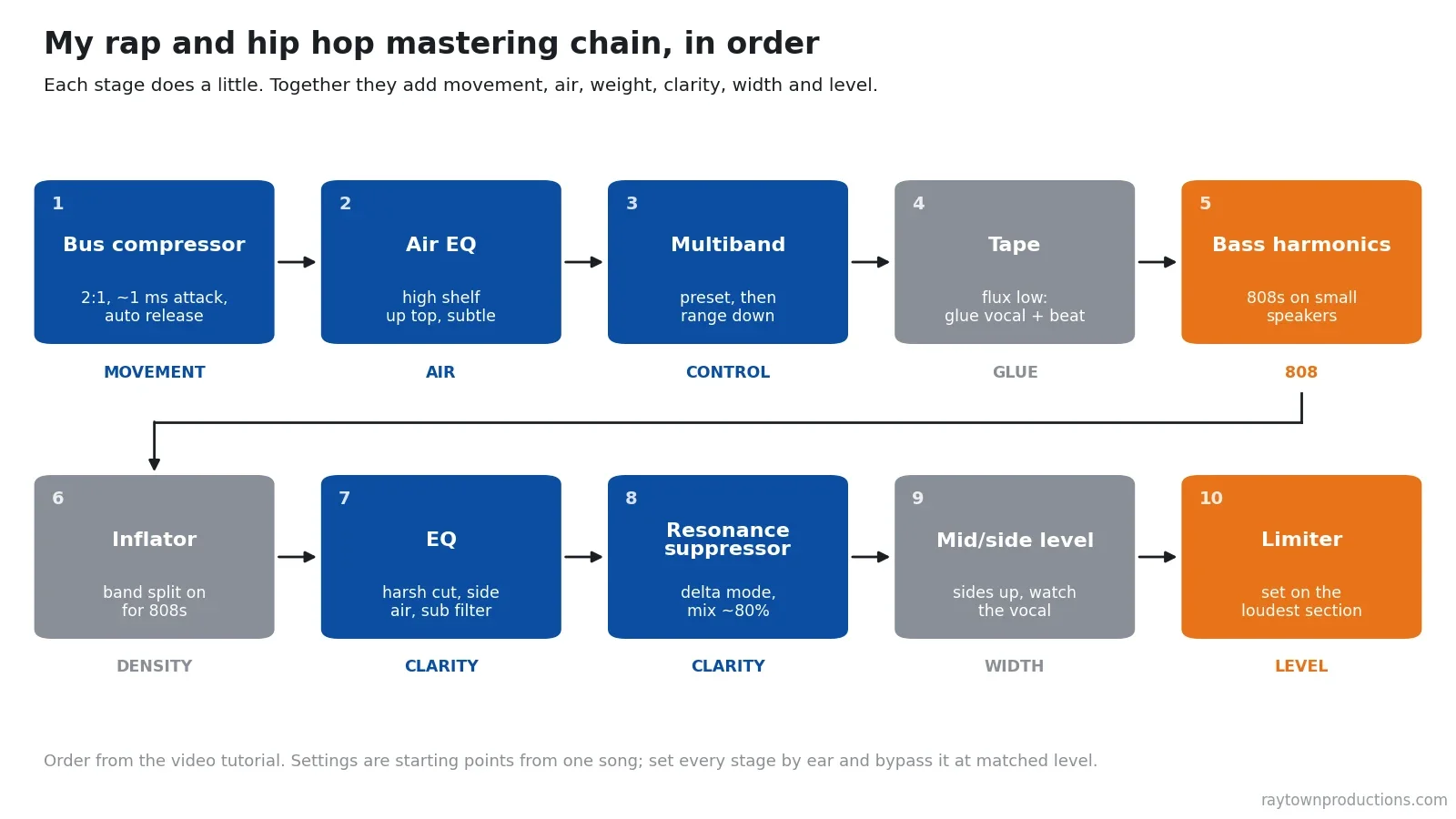
| # | Stage (plugin in the video) | Starting point from the video | Listen for |
|---|---|---|---|
| 1 | Bus compressor (Waves SSL G-Master Buss) | 2:1, 1 ms attack, auto release, threshold backed off until it’s barely noticeable | The song bobs with your head; no swelling |
| 2 | Air EQ (Waves PuigTec EQP-1A) | 16 kHz boost, sharp bandwidth, pulled back past the point you stop hearing it | Silky air on hats and vocal, nothing brittle |
| 3 | Multiband (Waves Linear Phase Multiband) | “Multi Opto Mastering” preset, range pulled down in the loudest chorus, faster attack on the top band | Bands dance with the music; hats still have a transient |
| 4 | Tape (Waves Kramer Master Tape) | Flux up until it distorts, then well back | Vocal pulled into the beat, no audible distortion |
| 5 | Bass harmonics (Waves MaxxBass) | Only if needed; ride it up from zero | 808 audible on a phone, low end not muddy |
| 6 | Sonnox Oxford Inflator | Band split on for bass-heavy songs; effect up until it’s too much, then back | Fuller and louder, kicks still hit |
| 7 | EQ (FabFilter Pro-Q 2) | Gentle cut at the harsh spot (about 1.5 kHz here), +1 to 2 dB at 15 kHz on the sides, linear-phase high-pass around 26 to 28 Hz | Vocal tucked in, wider top, 808 intact on a sub |
| 8 | Resonance suppressor (oeksound Soothe2) | Find the spots in delta mode, mix around 80% | Edge gone, no lisp |
| 9 | Mid/side level (Waves Center) | Sides up a little | Wider, vocal still in front |
| 10 | Limiter (FabFilter Pro-L) | Set on the loudest section | 808 punch and movement survive |
For a full breakdown of every plugin in a mastering chain, see my full mastering plugin chain. The hip hop-specific listening in this article applies to any chain.
What Makes Mastering Hip Hop Different?
Four things make rap and trap masters harder than most genres:
- The 808 carries the song, and it’s the first thing a limiter or too much saturation destroys. It’s also the first thing that disappears on small speakers.
- The lead vocal is the song. It has to stay in front, clear and intelligible, without getting harsh or sibilant as the master gets louder.
- Modern hip hop has a very bright top end, so it’s easy to cross from airy into brittle and fatiguing.
- The groove has to keep moving. A master that is the same volume all the time sounds flat and tiring, with no breathing in it.
The artist and producer spent a lot of time and money on that mix. Crank a bunch of knobs and the song loses its vibe. So the rule for every plugin below is: be subtle. Bypass a stage and the song should feel like it’s missing something, but you shouldn’t hear the plugin working.
How Should You Set a Mastering Compressor for Hip Hop?
The first thing I put on a hip hop track is a compressor. I use an SSL-style bus compressor because it has a cool vibe, but any compressor will do as long as it does what you want. Its job here is to add a little movement to the song. Too much and the song swells in and out until you feel seasick. That’s an effect you hear on EDM, but in mastering we want it transparent.
Here’s how I dial it in, in order:
- Exaggerate first. Set a high ratio and the fastest release, and pull the threshold down until it’s really biting into the music. Now you can hear what every other control does.
- Set the attack. A slower attack lets more of the initial punch of the low end through. A very fast attack sounds smooth but squashed. I liked 3 to 10 ms on this song and settled on 1 ms.
- Set the release to the groove. Make the compressor let go in time with your head nodding to the beat. The SSL’s auto release has a unique feel that often sounds great for mastering, and it’s what I kept here.
- Tuck it in. Drop the ratio to 2:1 (10:1 smashes anything over the threshold) and back the threshold off until it’s barely noticeable.
Watch the input level. At one point I was taking off around 16 dB, which is way too much. Instead of just raising the threshold, I turned down the input gain going into the chain so the compressor works less, then made it up with the output.
How Do You Add Air Without Making the Master Harsh?
Modern music has a bright top end, but we want it airy, not brittle. I use the Waves PuigTec EQP-1A, basically two shelves with a really smooth sound in the highest frequencies. I set the boost at 16 kHz and compared the sharp and broad bandwidth settings. Sharp kept the boost focused on the hi-hats and the air in the vocal, so I kept it.
My method: put way too much in, then dial it back until you can’t really hear it, then pull it back a little more. Always err on the side of less. As the chain gets louder toward the limiter, those high frequencies build up and get fatiguing.
Compare settings fast. When I’m comparing two settings, I flip quickly between extremes instead of slowly turning a knob. Slow changes are almost impossible to hear; fast flips make the difference obvious.
Next is a multiband compressor, which I use as another insurance policy. A song’s balance changes as it goes: the chorus stacks up vocals, ad-libs pile in later, and some frequency ranges start building up. The multiband pulls those back only when they happen. I load the “Multi Opto Mastering” preset in the Waves Linear Phase Multiband, leave the gains alone, and drag the range down in the loudest chorus until the bands start moving with the music. Then I back it off.
If the top band isn’t catching the harsh hi-hat ticks, speed up its attack. On this song, 24 ms on the band around 11 kHz let every sharp transient through. A faster attack smoothed the top end, then I slowed it again just enough for the hats to breathe.
How Do You Make 808s Sound Good on Small Speakers?
Before the bass work, I glue the vocal and beat together with tape saturation (Waves Kramer Master Tape). Push the flux control until you hear distortion, then back way off, and a little more to be safe. It squeezes the mix together: the vocal gets pulled into the beat, and the beat starts responding to the way the vocal is performed.
Now the 808s. A lot of 808s have almost no high-frequency information. Without a subwoofer, you just don’t hear them. On a phone or cheap earbuds the 808 can vanish completely. A harmonic generator like Waves MaxxBass fixes that by creating higher harmonics of the bass, which small speakers can play.
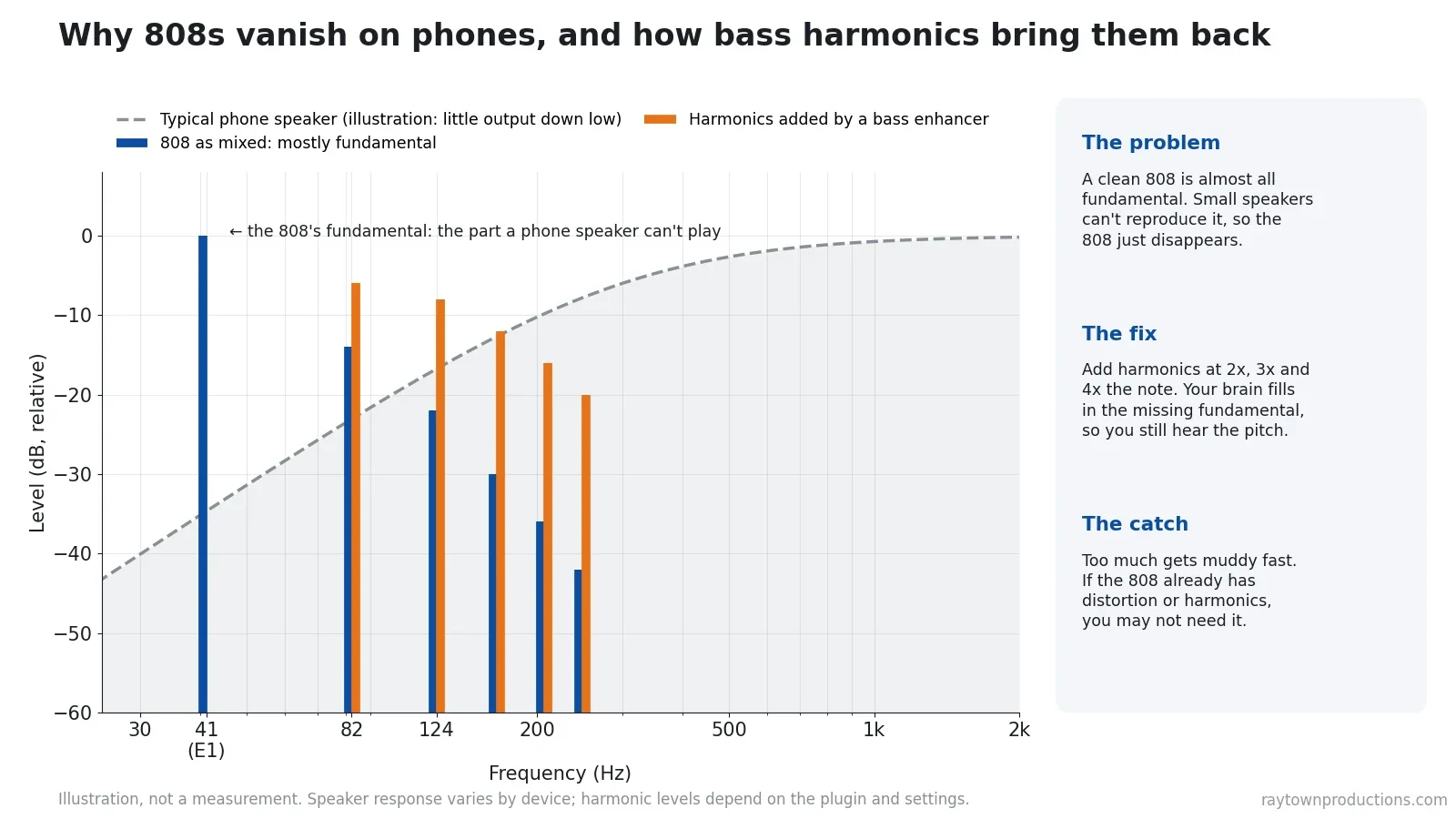
This works because of a well-known effect called the missing fundamental: when you hear a series of harmonics, your brain fills in the low note even if it isn’t there. But it can go crazy on your low end fast. On this song the producer had already built a lot of high-frequency content into the 808, so I wasn’t sure I’d need it. A little helped, and soloing only the added signal showed it was also filling out the vocal, like someone rapping next door. Use your ears, not a rule.
Then the Sonnox Oxford Inflator, which I talk about all the time. It adds loudness and fullness and brings up subtle details in the beat and vocal without sounding squashed. For hip hop or any bass-heavy song, turn on Band Split. According to the manual, it processes the low, mid and high ranges separately to avoid intermodulation distortion, which in practice stops the 808s from breaking up.
Bass harmonics come back to haunt you. Everything you add down low uses up speaker movement and limiter headroom, whether you can hear it or not. That’s why the next EQ filters the deep sub.
How Do You Keep the Rap Vocal Clear in the Master?
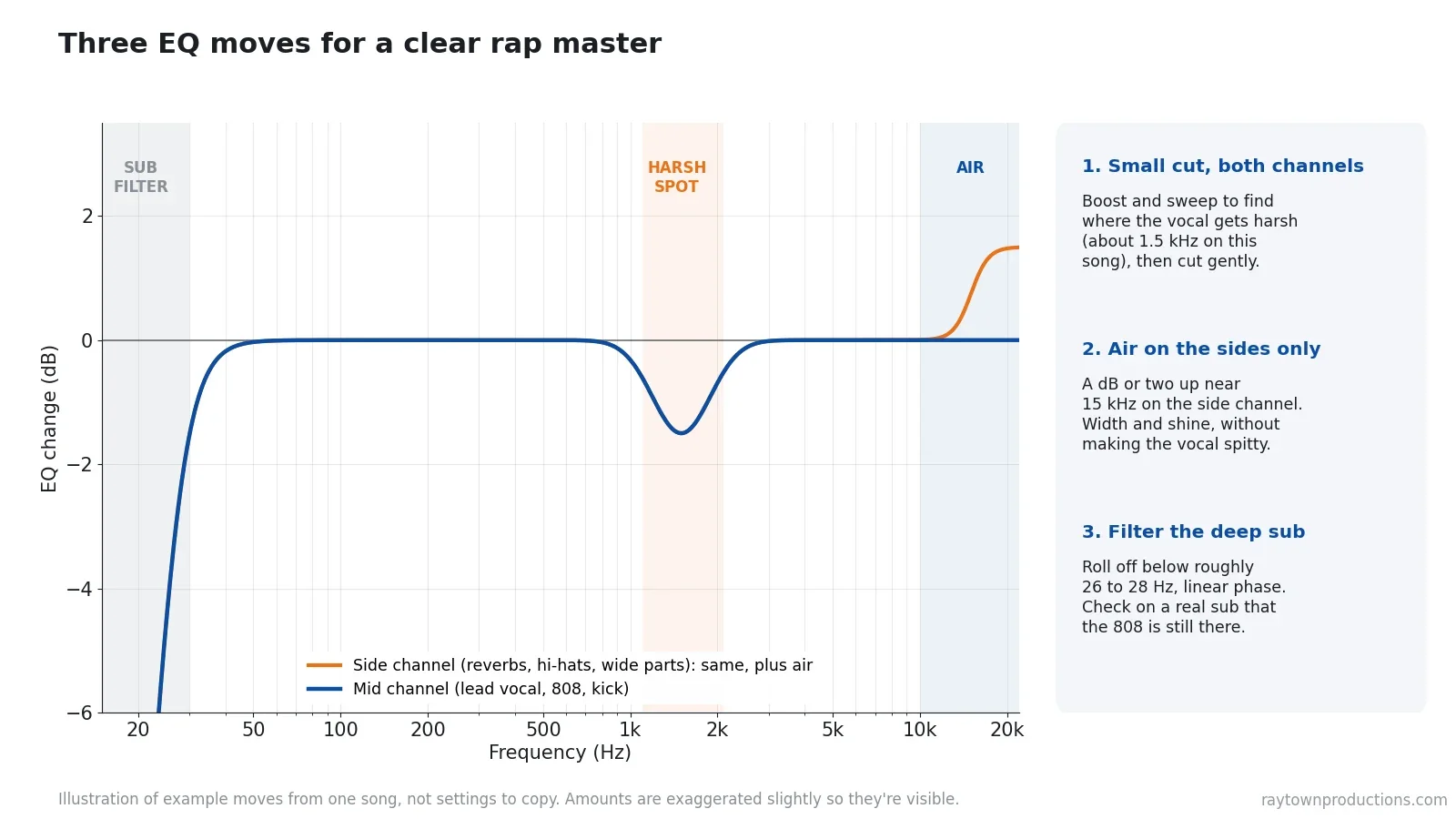
Find the harsh spot. The vocal on this song got a bit bright and harsh around 1.5 kHz. To find a spot like that, boost an EQ band and sweep until it sounds really bad, then turn the boost into a gentle cut. Now the vocal sat nicely tucked in, but a little darker.
Add air to the sides only. I wanted the air back, but not on the vocal, where it turns into sibilance. So I switched the EQ to mid/side mode and added a dB or two at about 15 kHz on the side channel only. That brightens the reverbs and hi-hats and adds a little width, and the centered vocal doesn’t change.
Filter the deep sub. I roll off everything below roughly 26 to 28 Hz. Even if you can’t hear it, it makes your speaker move, and removing it frees up energy for a louder master. Hip hop often has real sub information that low, so check on a subwoofer that the 808 hasn’t lost its weight. I use linear-phase mode for this cut to avoid the phase shift a normal filter adds around the cutoff (the trade-off is latency and a little pre-ringing).
Smooth out what’s left. For the whistling, resonant frequencies an EQ can’t catch, I use oeksound Soothe2 (now succeeded by soothe3). It works like a very transparent de-esser that finds and reduces resonances instead of turning down a whole band. My approach:
- Turn on delta mode so you hear only what it’s removing, and set it aggressive.
- Sweep to the worst spots and boost those bands into the detection. On this song I heard a lingering whistle in the vocal, plus areas around 1 to 3 kHz and 8 kHz. On a metal song I’d go after 4 kHz.
- Adjust sharpness and selectivity until delta sounds irritating, not musical. Musical means you’re removing the wrong thing.
- Leave delta mode and raise the depth until the edge comes off. If the rapper starts sounding like he has a lisp, it’s too much.
- Bring the mix down to about 80% so some of the original comes through. It sounds more natural.
How Do You Make a Hip Hop Master Wider?
A lot of people reach for a stereo enhancer for width. Push one too far and the mix sounds fake, like it’s behind your head, and the low end gets strange. When I close my eyes, I want to feel like the rapper is right in front of me, like at a concert.
So I use Waves Center, which simply has a level for the center and a level for the sides. Raising the sides adds width without the fake sound. The catch: the vocal is usually in the center, so turning the sides up pushes the rapper back. Listen to the main vocal and the sides together and find the spot where it sounds big and the vocal is still the front-most element. The same tool works the other way too: on songs with too much side information, I push the center up to bring the vocal forward.
On this song the wider sides made the hi-hats too bright, until they felt like they were in front of the vocal. Instead of giving up the width, I went back to the multiband and made its top-band attack faster. Mastering stages affect each other, so don’t be afraid to go back.
How Loud Should a Rap Master Be?
Last comes the limiter. I used FabFilter Pro-L (there’s a newer Pro-L 2 with more features, but I like simple tools that keep me focused on the song). Try each algorithm on your limiter and listen to two things: the low end, where limiters differ a lot, and the transients up top. You still want some movement, not a song squished to the same volume the whole time.
- Set it on the loudest section, so the quiet parts don’t fool you and the chorus doesn’t go crazy later.
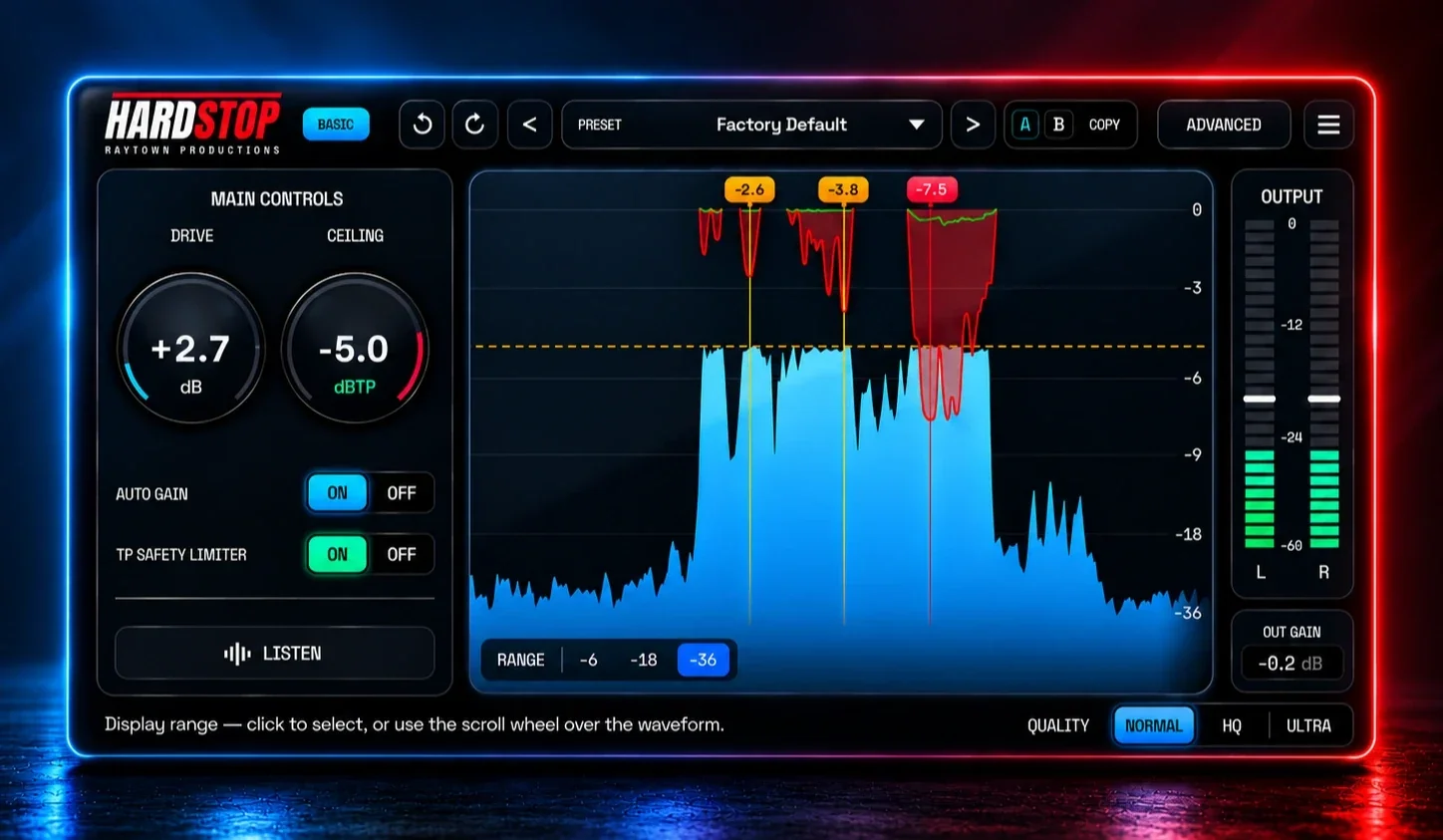
- Raise the input until the 808 starts to die, the bass falls away, or everything sounds too consistent. That’s too far. Back off.
- Don’t watch graphs. Feel the music: the impact, the high end and the life should still be there.
- Readjust upstream. When the low end got unruly at full volume, I backed off an earlier stage a tiny bit and pulled the multiband down a touch so it tamed the punchiest moments.
If you need more level than the limiter can give cleanly, a clean clipper in front of it can shave the fastest kick and 808 peaks first, so the limiter works less. I explain why in clipping before limiting. My plugin HardStop is built for exactly that: a clean, anti-aliased clipper. Get the HardStop clipper plugin for free.
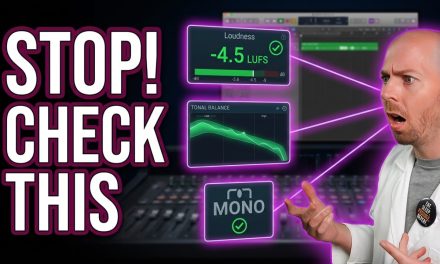
What about streaming? Spotify’s loudness documentation says it adjusts tracks to -14 LUFS integrated by default: louder masters get turned down and softer ones turned up. It asks for true peaks below -1 dBTP, or below -2 dBTP for masters louder than -14 LUFS. A rap master that’s crushed to be loud gains nothing after normalization except the lost punch. I cover the numbers for each platform in how loud your song should be for streaming and why some loud songs still sound quiet in why your songs aren’t loud on streaming.
| Stage | You’ve gone too far when… |
|---|---|
| Bus compressor | The song swells in and out, or loses its punch |
| Air EQ | Hi-hats and esses get brittle as the master gets louder |
| Multiband | The chorus sounds squished, or the hats lose their transient |
| Tape / Inflator | You can hear distortion, or the 808 breaks up |
| Bass harmonics | The low end gets muddy on a full-range system |
| Soothe | The rapper sounds like he has a lisp, or the air is gone |
| Side level | The hi-hats or reverbs step in front of the vocal |
| Limiter | The 808 loses its impact and the song stops moving |
How Do You Know the Master Is Actually Better?
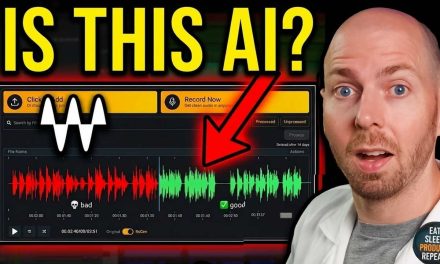
The moment of truth: bypass every plugin and compare. But first, level-match. My master was 4.8 dB louder than the mix, and louder always sounds better, so without matching you’re cheating your ears.
Listen for the width, the fullness of the low end and that subtle movement. Without the master, everything on this song sat on top of each other and the rapper felt far back. With it, the song blew up wide and the rapper was right in front of me, like I was looking at him on stage. Then check it on a phone, earbuds and in a car.
If you’re sending your song to a mastering engineer instead, my tips for online song mastering will help you get the most from it. And if you have questions about your own master, send me a message through the contact form on my website, or ask for a mix or master critique: a custom video review of your song with my feedback.
How do you approach mastering rap, trap or hip hop? Leave a comment below!
Plugins Used in This Tutorial
- Waves SSL G-Master Buss Compressor
- Waves PuigTec EQs
- Waves Linear Phase Multiband Compressor
- Waves Kramer Master Tape
- Waves MaxxBass
- Waves Center
- Sonnox Oxford Inflator
- oeksound Soothe (current version)
- FabFilter Pro-Q (current version)
- FabFilter Pro-L 2 (the newer version of the limiter I used)
- HardStop: my clean clipper plugin (free download)
Some of these are affiliate links. If you buy through them, Raytown Productions may earn a small commission at no extra cost to you. It helps keep these tutorials free.

Grab All My Favorite FREE Plugins!
Key takeaways
- Be subtle: every stage should do a little. Bypass it and the song should feel like it’s missing something.
- Groove first: a 2:1 bus compressor with the release timed to the beat adds movement without pumping.
- 808s: add harmonics only if they vanish on small speakers, use band split on saturation, and filter the deep sub.
- Vocal clarity: tuck the harsh spot, add air to the sides only, and smooth resonances until just before the lisp.
- Width: raise the sides only as far as the vocal stays in front.
- Loudness: set the limiter on the loudest section and stop when the 808 loses impact. Spotify normalizes to -14 LUFS anyway.
- Always A/B at matched level before you trust what you hear.
Frequently asked questions
What is the best plugin chain for mastering rap?
There isn’t one best chain, but a reliable order is: a gentle bus compressor for groove, a subtle high-end EQ for air, a multiband compressor as a safety net, saturation to glue the vocal and beat, bass harmonics only if the 808s disappear on small speakers, corrective and mid/side EQ, a resonance suppressor for harsh spots, a little side level for width, and a limiter last. Every stage should do a little. If you can clearly hear a plugin working, it’s probably doing too much.
How do I make my 808s audible on phone speakers?
Phone and laptop speakers can’t reproduce the low fundamental of most 808s. Add harmonics of the bass with a bass enhancer or gentle saturation, so the ear hears the pitch from the overtones. Use only as much as you need, check that it doesn’t muddy the low end on a full-range system, and skip it if the 808 already has distortion or harmonics built in.
How loud should I master a rap song for Spotify?
Spotify normalizes playback to -14 LUFS integrated by default, so a louder master is turned down and a quieter one is turned up. Spotify asks for true peaks below -1 dBTP, or below -2 dBTP if the master is louder than -14 LUFS. Many rap masters are made louder than -14 LUFS anyway. The real limit is the 808: when it starts losing impact, back off.
Should I use a mid/side EQ when mastering hip hop?
It’s useful for one job in particular: adding a dB or two of air to the side channel only, so the beat and reverbs get brighter and wider while the centered lead vocal doesn’t get more sibilant. Keep the moves small and check the master in mono.
Can I master my own rap songs at home?
Yes. Mastering is mostly careful listening: small moves, checking each plugin in bypass at matched level, and testing the master on phones, earbuds and a car. A second set of ears helps most when you mixed the song yourself, because you get used to its problems.
Want Your Rap Song Mastered for You?
I mix and master rap, trap and hip hop for independent artists and producers. Tell me about your song and I’ll make sure the 808s hit and the vocal stays upfront on every system. Turnaround and revision details are in the FAQ. Or learn the whole process in my courses.






Trackbacks/Pingbacks