

How to Master EDM and Dance Music: 9 Secrets From My Mastering Chain
Quick summary
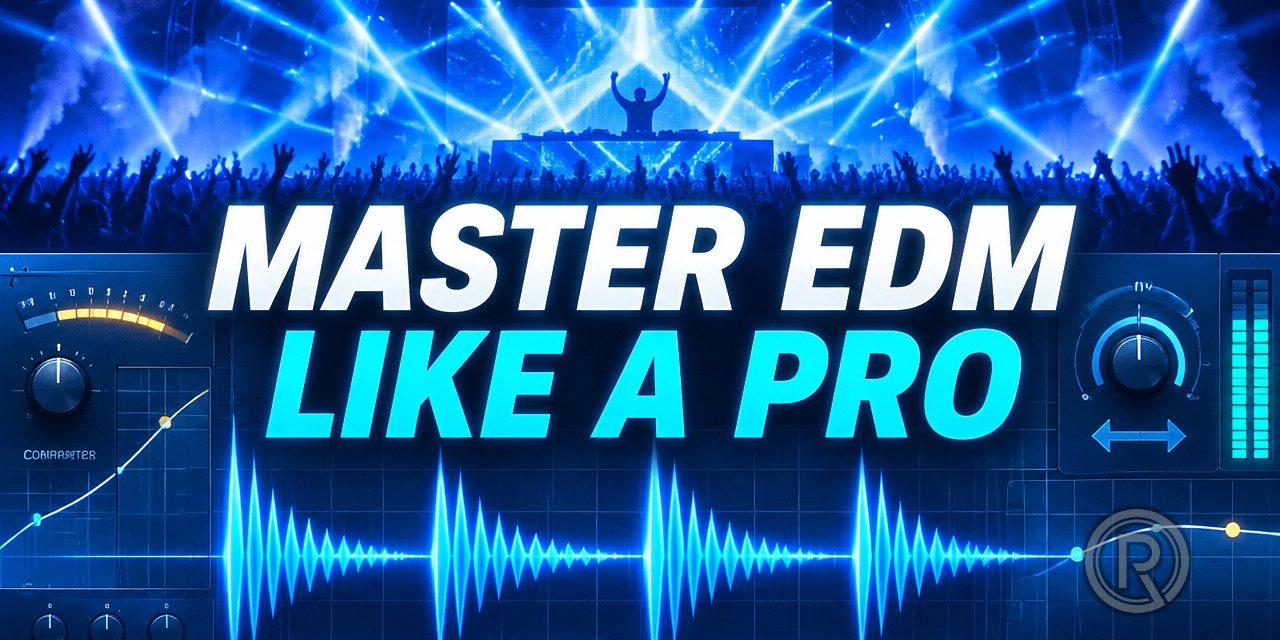
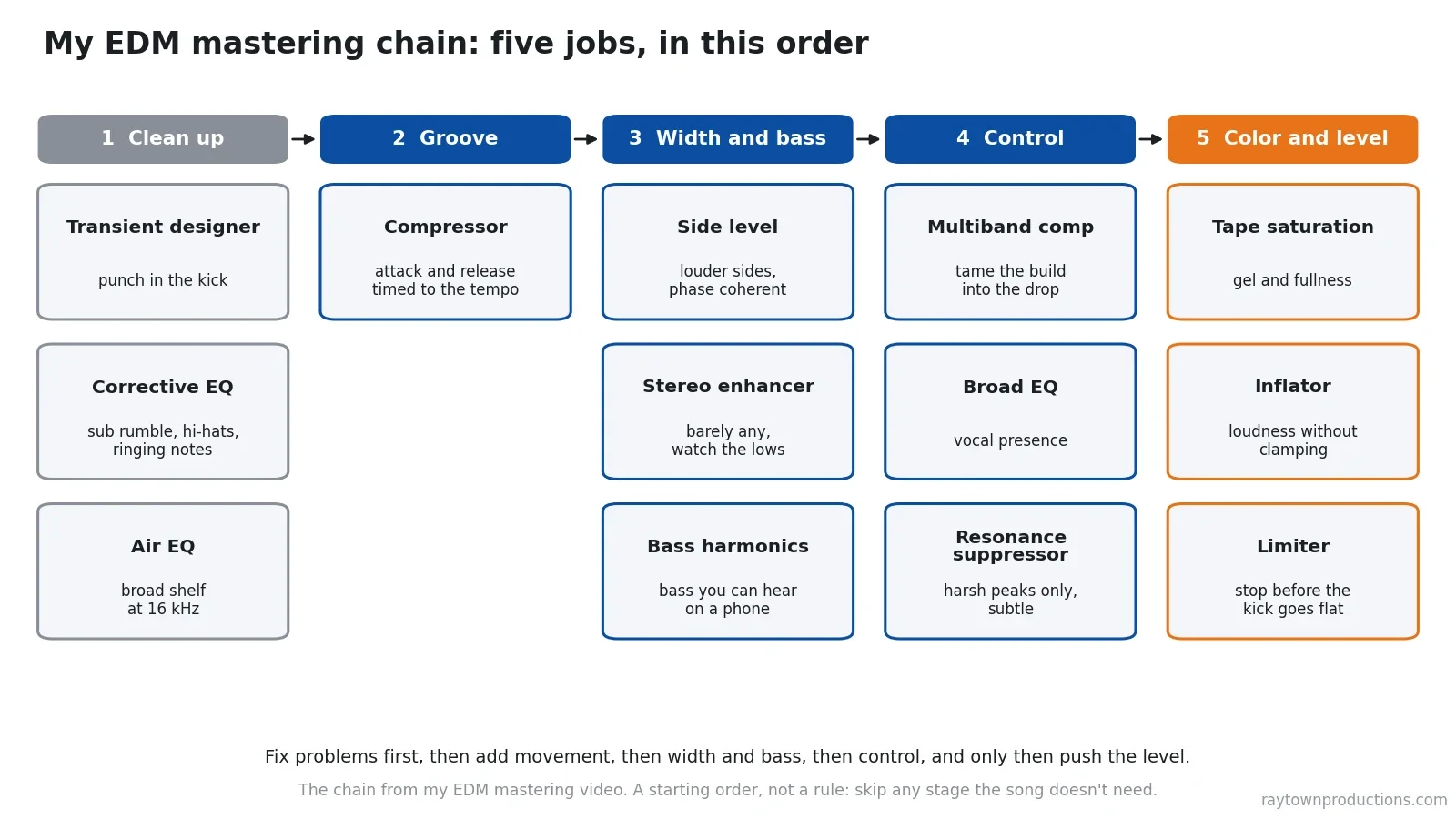
To master EDM and dance music, fix the mix’s problems first, then build energy in this order: bring out the kick’s transients, clean up the sub rumble and harsh or ringing frequencies, add air with a broad high shelf, set a compressor with attack and release timed to the tempo so the track grooves, widen the sides without touching the low end, add bass harmonics so the low end translates to phones, tame the build into the drop with a multiband compressor, then saturate and limit only until the kick starts to flatten. Finally, compare the master to the mix at the same volume. Below is my full chain from the video, with the reason for each step, a tempo chart and starting points.
Updated : completely rewritten and expanded with the reasoning behind each step, three new illustrations, a tempo-to-milliseconds chart, a chain summary table, current streaming loudness guidance and FAQs. Originally published .
What’s In This Article
- What Makes Mastering EDM Different?
- How Do You Make the Kick Punch Through in an EDM Master?
- What EQ Moves Clean Up a Dance Mix Before Mastering?
- How Do You Set a Mastering Compressor to Groove With the Tempo?
- How Wide Should an EDM Master Be?
- How Do You Make EDM Bass Sound Big on Phones and Laptops?
- How Do You Stop Harshness When the Drop Hits?
- How Loud Should You Master EDM?
- Why Compare the Master to the Mix at the Same Volume?
- My Full EDM Mastering Chain
Key moments in the video
- 1:54: JST Transify to improve transient response
- 4:03: FabFilter Pro-Q 2 to clean up low end, clarify vocals and ease the top end
- 9:46: Waves PuigTec to add air to the mix
- 12:32: Secret to dial in the perfect groove
- 15:27: Waves Center to make the stereo image wider
- 17:09: Subtlety is everything with stereo enhancement
- 19:00: Waves MaxxBass to make bass sound huge on all devices
- 20:47: FabFilter Pro-MB to squeeze and gel the song together
- 24:14: Secret weapon for harsh top end: Oeksound Soothe
- 33:16: Reference the original track at the SAME volume
Enjoying the Video?
Get more home-studio tutorials, mixing breakdowns, and gear deep-dives every week.
Mastering EDM and dance music is one of the most rewarding things I get to do. When you master a dance track just right, you can make a room full of people get up and dance like it’s the last night of their lives. Getting it right is tricky, though, so in the video above I master a pop EDM song, “Punchline” by Ailia, from start to finish and show every plugin and setting.
This article walks through the same process with the why behind each move: how to enhance the groove, how to keep the bass from sounding weak on small speakers, and what to watch out for so the drop still hits once the track is loud.
What Makes Mastering EDM Different?
When someone sends me a song for mastering, my job is to make it sound good anywhere it’s played: on a phone, on earbuds, in a car and in a club. If mastering in general is new to you, start with what mastering is and why you need it. Dance music raises the stakes in a few specific places:
- The kick and bass carry the song, on a club system and on a phone speaker.
- Groove is the point. A master that doesn’t move feels lifeless on a dance floor.
- Width is part of the genre, but too much wrecks the low end.
- The drop needs room. Pushing for loudness flattens the kick.
Before I touch anything, I listen and note what needs fixing. This mix was intentionally a little dark, but it sounded like there was a sheet over it: the mids were a bit muddy, the low end didn’t feel extended, the transients and punch weren’t quite there, it was missing sparkle and it sounded narrow. Every move below answers one of those notes.
How Do You Make the Kick Punch Through in an EDM Master?
The first thing I did was bring out the transients, the punch of the kick and snare. I used JST Transify, a transient designer split into frequency bands. It’s normally used on drums or guitars, and I’d never really used it on a master before, but it was exactly what this song needed.
I raised the attack in the low band only, to put a little more thump in the kick, and a touch in the very top band to bring the vocals forward. Everything else stayed off. The result is subtle: the kick and the bass become more separated and defined, and the vocal gets a bit more in-your-face.
Go overboard and you’ll hear why it has to be subtle. Too much top-band attack makes the hi-hats loud and irritating and the vocals start moving around in a weird way.
And remember: there are no rules. If it makes the song better, you can do it on a master.
What EQ Moves Clean Up a Dance Mix Before Mastering?
Next, a clean surgical EQ (FabFilter Pro-Q 2 in the video; Pro-Q 4 is the current version). This song is supposed to sound modern but not over-the-top bright, so the goal was clarity, not brightness:
- Cut the rumble below 20 Hz. You can see it dancing on the analyzer but you can’t hear it. It just makes the subwoofer work harder and takes energy away from the parts of the song you can hear.
- Ease the hi-hats. A gentle dip of about 1.5 to 2 dB where they were harsh. Our ears are very sensitive in that region, and once the song gets loud at the end of the chain it would get annoying fast.
- Lift vocal intelligibility. About 1 dB in the upper mids, where we understand the words. It gives the vocal a louder perceived level without turning anything else up.
- Notch out ringing notes. An ambient guitar in the intro had a couple of notes that rang like a wineglass. Not musical, just distracting. Two very narrow cuts of about 7 to 8 dB removed them.
Then the tone-shaping move: air. One of my favorites for this is the Waves PuigTec EQP-1A. I set the high boost to 16 kHz, which is above most of the harsh, sibilant part of the vocal, with a very broad bandwidth, and bring it in just a little. It puts a spacious, 3D sheen over the whole mix. Too much turns harsh; bypass it and the blanket is back.
How Do You Set a Mastering Compressor to Groove With the Tempo?
With the low end no longer loose, a compressor can do what I really want on a dance track: put movement and groove into the mix. When the kick hits, the whole mix should gently bob up and down with the rhythm.
For electronic music I used FabFilter Pro-C 2 (now Pro-C 3). On rock or metal I’d probably reach for an SSL-style bus compressor because of how its attack and release react, but on electronic music I want precise control over how the song breathes.
The secret is timing. I always time the attack and release to the tempo of the song, using a delay timing chart that converts BPM into milliseconds. This song is 85 BPM, and a sixteenth note at 85 BPM is 176.5 ms, so the compressor bobs on the order of a sixteenth note. Without it the song just doesn’t feel like it goes anywhere. With it, it lives and breathes.
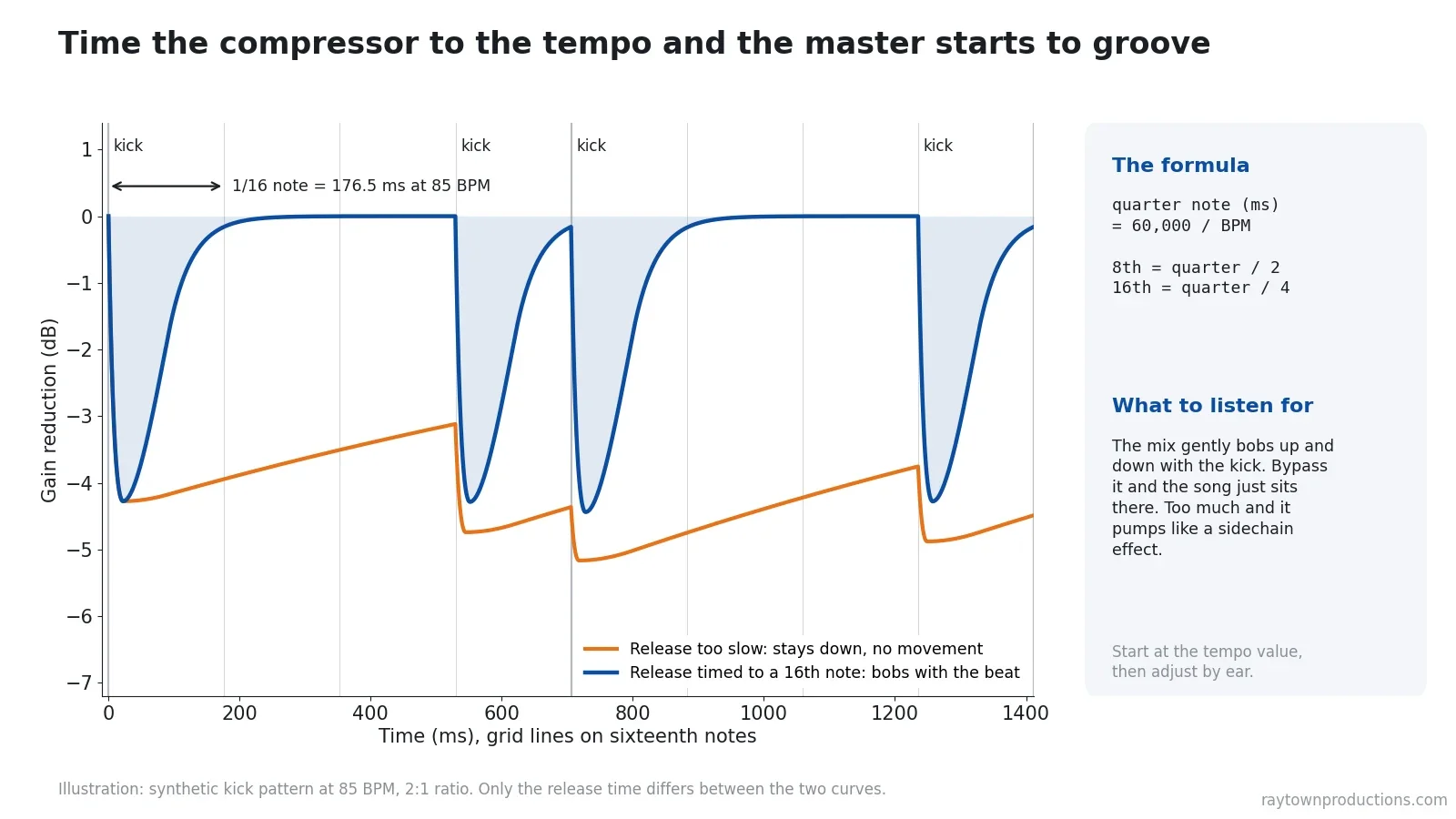
Quarter note in milliseconds = 60,000 ÷ BPM. Halve it for an eighth, quarter it for a sixteenth. Here are the common dance tempos worked out. Use them as starting points for the release, then adjust by ear:
| Tempo (BPM) | Quarter note | Eighth note | Sixteenth note |
|---|---|---|---|
| 85 (video song) | 705.9 ms | 352.9 ms | 176.5 ms |
| 120 (house, pop dance) | 500.0 ms | 250.0 ms | 125.0 ms |
| 124 (house) | 483.9 ms | 241.9 ms | 121.0 ms |
| 128 (house, EDM) | 468.8 ms | 234.4 ms | 117.2 ms |
| 140 (dubstep, trance) | 428.6 ms | 214.3 ms | 107.1 ms |
| 150 (hardstyle) | 400.0 ms | 200.0 ms | 100.0 ms |
| 174 (drum & bass) | 344.8 ms | 172.4 ms | 86.2 ms |
Want free printable compressor timing sheets? My free Producer Pack has the note timings for every BPM, plus the frequency of every musical note, as cheat sheets you can print and keep next to your DAW. Enter your email below and I’ll send it to you.
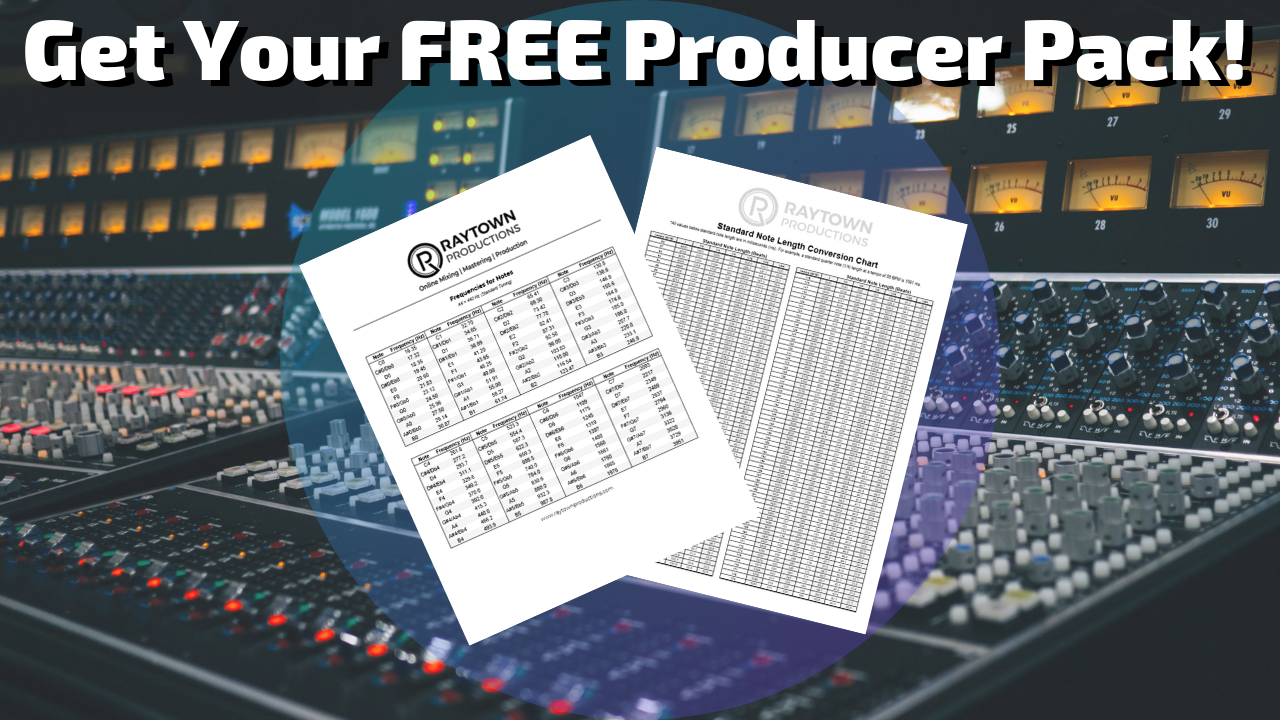
GET YOUR FREE PRODUCER PACK!
Keep the gain reduction gentle. The movement you set here gets partly subdued once you push the level later, but if it already pumps like a sidechain effect at this stage, it’s too much.
How Wide Should an EDM Master Be?
Electronic music usually has a huge, super-wide stereo image, and this song felt narrow. I widen in two steps, and the order matters.
Step 1: turn up the sides. I used Waves Center, which splits the mix into center and sides so you can change their balance. Turning the sides up leaves anything dead center (kick, snare, bass, lead vocal) exactly where it was and makes everything with stereo information louder. It isn’t fake width from phasing, just volume, so it stays phase coherent. How far to go depends on the artist.
Step 2: add a little stereo enhancement. In this genre I want an unnaturally wide feel that still doesn’t sound fake: you should still be able to close your eyes and see everything. I used the Shuffler in the Waves S1 Stereo Imager, and I barely push it at all, because I’m terrified of what it does to the low end. Crank it and the kick and bass get loose, phasey and weird. A tiny amount adds the extra dimension and sparkle that people can’t quite put their finger on, especially on headphones.
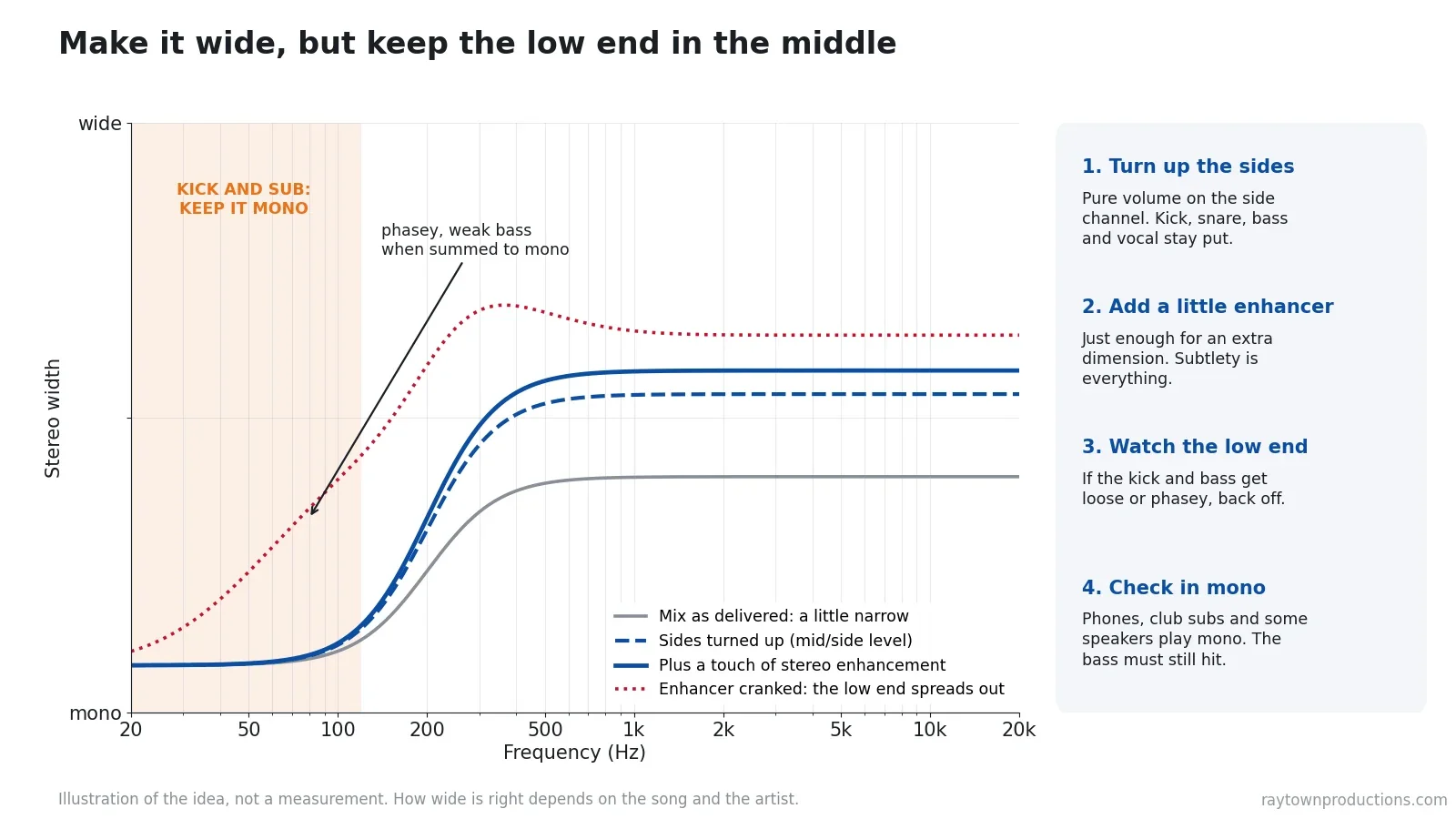
Subtlety is everything, so check in mono. Many club systems feed their subwoofers a mono signal, and phones often play in mono. Flip your monitoring to mono after any width move: if the kick or bass gets weaker, back the width off.
How Do You Make EDM Bass Sound Big on Phones and Laptops?
This kind of music is very sub-heavy, and a phone or laptop speaker simply can’t play the sub. So on sub-heavy dance tracks I use Waves MaxxBass. It takes the information in the sub bass and generates harmonics of it higher up, where small speakers can play them. Your ear fills in the missing fundamental, so the bass still sounds present instead of disappearing. I think this is really important on a dance master; otherwise you lose the fullness the subwoofer would normally give you.
Match levels before you judge it and listen only to the low end. The same small-speaker problem shows up with 808s, and I cover it from the rap side in my guide to mastering rap, trap and hip-hop, the sibling to this one.
How Do You Stop Harshness When the Drop Hits?
Dance tracks build and build, then the chorus or drop hits and everything comes in at once. I need something that makes sure nothing jumps out. That’s a job for a multiband compressor. I normally use a Waves multiband, but for electronic music I used FabFilter Pro-MB because it felt more musical.
- Sub band: keeps the sub steady as the arrangement fills up.
- Low mids: the muddy region. It ducks whenever the mud builds, so the mix stays clear and detailed.
- Vocal presence: here I actually boost a little, so the vocal keeps its clarity the whole time, and it only turns down if there’s too much.
- Air on top: catches the hi-hats before they get stabby, which matters most when a club system is cranked.
When the arrangement is sparse it doesn’t touch the mix. A dynamic EQ can do the same job.
After that, a couple of broad EQ moves to open the top end and bring the vocal forward without making the hi-hats brighter. Then my secret weapon: Oeksound Soothe (now soothe2). It works like an intelligent de-esser across the whole spectrum, turning down harsh resonances only when they pop up. On this song it caught the ringing I had EQ’d earlier, the harshest hi-hat hits and the sibilance in the vocal, so the song could be cranked without hurting your ears.
Don’t go overboard with Soothe. It has a sound, and too much makes every song sound the same: the singer gets a lisp, and so do the drums and guitars. Use it just enough that the harshness is gone when you crank it.
How Loud Should You Master EDM?
Now the mix is shaped and pleasant, with a clear distinction between the kick and the bass. Three stages bring it up to level:
- Tape saturation (Waves Kramer Master Tape): a little compression and musical distortion that clamps the song together and adds fullness. Find the sweet spot between crushing it and leaving it too loose.
- Sonnox Oxford Inflator: when I met Sonnox at NAMM and asked what it actually does, they told me it’s magic. What you hear is saturation and harmonics that make a track louder and fuller without feeling clamped down.
- Limiter (FabFilter Pro-L, now Pro-L 2): it doesn’t sound harsh and doesn’t take away too much low end.
How I set the limiter: push the input until it’s clearly too loud. On this song the kick drum started to disappear, the track went flat, distorted and crunchy. Then back off until the kick returns and the song is loud and full but still breathes. Over-limiting sucks the feeling out by erasing the natural swells of the arrangement.
If the limiter is still flattening the kick at the level you need, a clean clipper in front of it can shave the sharpest peaks so the limiter works less. My own HardStop is built for exactly that, with a free Basic version; I explain the approach in clipping before limiting.
How loud is loud enough? Streaming services normalize. Spotify turns playback to -14 LUFS by default and recommends keeping true peaks below -1 dBTP, or below -2 dBTP if your master is louder than -14 LUFS (Spotify’s loudness guide). Apple Music’s Sound Check works the same way, adjusting playback volume from loudness data stored for each track (Apple Digital Masters). A dance master can be louder than -14 LUFS, but every dB past the point where the kick flattens gets turned down anyway. I go deeper in how loud your song should be for streaming.
Why Compare the Master to the Mix at the Same Volume?
It’s really easy to get to the end of a chain, think it sounds amazing, and realize all you really did was make it louder. Louder almost always sounds better at first. So the last step is always to reference the master against the original mix at the same volume, and make sure it still sounds better.
Turn the master down until both feel equally loud, then flip between them on the drop, the breakdown and the vocal. If the master doesn’t win at matched level, a stage is doing more harm than good. Then check it on a phone, earbuds and in the car.
My Full EDM Mastering Chain
Here’s the whole chain from the video in one place. The settings are what worked on this song, so treat them as starting points, not presets. For how I build a mastering chain in general, outside any one genre, see my full mastering plugin chain.
| # | Stage (plugin in the video) | What it does | Starting point / what to listen for |
|---|---|---|---|
| 1 | Transient designer (JST Transify) | Kick punch, kick/bass separation | Low band attack up a little, top band a touch. Hi-hats shouldn’t get louder. |
| 2 | Corrective EQ (FabFilter Pro-Q 2) | Cleanup and clarity | Cut below 20 Hz, about -1.5 to -2 dB on harsh hi-hats, +1 dB vocal presence, narrow notches on ringing notes. |
| 3 | Air EQ (Waves PuigTec EQP-1A) | Sheen and space | Broad boost at 16 kHz, a little. Back off if it turns harsh. |
| 4 | Compressor (FabFilter Pro-C 2) | Groove | Attack and release timed to the tempo (85 BPM: 176.5 ms per 16th). Gentle movement, no pumping. |
| 5 | Mid/side level (Waves Center) | Phase-coherent width | Sides up to taste. Center stays put. |
| 6 | Stereo enhancer (Waves S1 Shuffler) | Extra dimension | Barely any. Check the low end in mono. |
| 7 | Bass harmonics (Waves MaxxBass) | Bass on small speakers | Level-match before judging. Listen to the low end only. |
| 8 | Multiband compressor (FabFilter Pro-MB) | Control the build | Sub, low-mid mud, vocal presence (slight boost) and air bands. Works only when things build. |
| 9 | Broad EQ | Vocal forward, top end open | Brighten the vocal without brightening the hats. |
| 10 | Resonance suppressor (Oeksound Soothe) | Harshness | Subtle. If anything sounds lispy, it’s too much. |
| 11 | Tape saturation (Waves Kramer Master Tape) | Gel and fullness | Between crushed and too loose. |
| 12 | Sonnox Oxford Inflator | Loudness and fullness | Big but not clamped down. |
| 13 | Limiter (FabFilter Pro-L) | Final level | Push until the kick flattens, then back off. Compare at matched level. |
If you want a second pair of ears on your own dance master, send me a message through the contact form on my website. I can help with your master, or record a mix or master critique: a custom video review of your song with specific feedback. If you plan to send your track out for mastering, read my tips for online song mastering first.
What do you struggle with when finishing your EDM or dance songs? Leave a comment below and I’ll help you out.
Plugins Used in the Video
- FabFilter Pro-Q (EQ, current version)
- FabFilter Pro-MB (multiband compressor)
- FabFilter Pro-L 2 (limiter)
- Waves Kramer Master Tape
- Sonnox Oxford Inflator
- Oeksound soothe2
- Waves PuigTec EQs
- Waves Center
- Waves S1 Stereo Imager (Shuffler)
- Waves MaxxBass
- HardStop: my clean clipper (free Basic version)
- My FREE guide to the best free mixing and mastering plugins
Some of these are affiliate links. If you buy through them, Raytown Productions may earn a small commission at no extra cost to you. It helps keep these tutorials free.
Key takeaways
- Listen first: write down what the mix needs before you load a plugin. Every move should answer a note.
- Clean before you push: transients, sub rumble below 20 Hz, harsh hi-hats and ringing notes come first. Loudness makes every problem worse.
- Groove comes from timing: set compressor attack and release from the tempo (60,000 ÷ BPM), then adjust by ear.
- Width needs subtlety: raise the sides first, add only a touch of enhancement, keep the kick and sub in the middle, and check in mono.
- Bass must translate: harmonics of the sub help it read on phones and laptops.
- Loud, not flat: limit until the kick starts to disappear, then back off. Compare to the mix at the same volume.
Frequently asked questions
What is the best plugin chain for mastering EDM?
There’s no single best chain, but a reliable order is: clean up (transients, corrective EQ, air), add groove with a compressor timed to the tempo, set the width and bass translation, control the build with a multiband compressor and a resonance suppressor, then add saturation and limit. The order matters more than the brands. Stock plugins can fill most of these slots.
How do you set compressor attack and release for EDM mastering?
Time them to the tempo. Divide 60,000 by the BPM to get a quarter note in milliseconds, then divide by 2 for an eighth or 4 for a sixteenth. On the song in my video (85 BPM) a sixteenth note is 176.5 ms. Start there and adjust by ear until the mix gently moves with the kick without pumping.
Should the bass be mono in an EDM master?
The kick and sub should stay centered. Many club systems feed the subwoofers a mono signal, and phones and some speakers play in mono, so wide or out-of-phase low end can get weaker or disappear. Widen the mids and highs, keep the low end in the middle, and always check the master in mono.
How loud should an EDM master be for streaming?
Streaming services turn loud songs down. Spotify normalizes to -14 LUFS by default and recommends keeping true peaks below -1 dBTP, or below -2 dBTP if the master is louder than -14 LUFS. You can master louder than that for a dance track, but stop before the kick loses its punch, because the extra level gets turned down anyway.
Why does my EDM master sound worse after limiting?
Usually the limiter is working too hard. When you push it, the kick drum gets flattened, the natural swells in the arrangement disappear and the top end starts to crunch. Back the input off until the kick comes back, and compare to the unmastered mix at the same volume before deciding.
Want Your Dance Track Mastered for You?
I mix and master EDM, pop and dance music for independent artists and producers: mixes take 3 to 5 days, masters 1 to 3 days, with unlimited free revisions for 10 days. Tell me about your song or read the FAQ. Or learn the whole process yourself in my courses.